The Open an Archived Database facility enables Polygon Back Office users to recall and view a previously archived financial year for reference and reporting purposes.

From Polygon Back Office, Select File from the main menu, Go to Database Archive, Then select Open an Archived Database
|
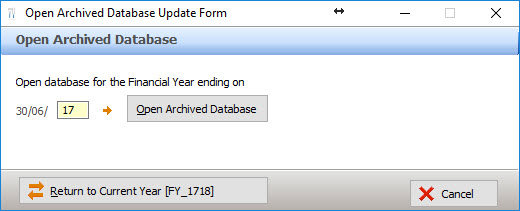
Enter the ending year of the archived financial year to be accessed. Click the Open Archived Database button.
A confirmation message is displayed. Click OK and the title bar will include the restored year in the program heading. For example: "Polygon Back Office [... FY_1617]". Access reports and information as required.
IMPORTANT: remember to return to the current database after accessing an archived database. See section below for information.
Restoring the current financial year database
The current financial year data must be restored after accessing a previously archived financial year.
From Polygon Back Office, Select File from the main menu, Go to Database Archive, Then select Open an Archived Database
|
Press the Return to Current Year button.
Click OK to the confirmation message displayed.
See Also:
Polygon Back Office > Archive Database