Programming of Production Ingredient PLUs will allow production jobs to display generic ingredient names, in place of the product names.
For example:
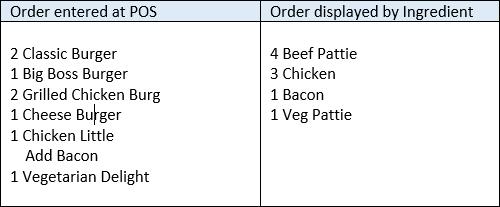
Required Settings
For the POS to recognise and recompile production print jobs replacing PLU items with Production Ingredients, the Enable PLU ingredient printing setting needs to be activated in the Location System Settings | POS Terminal Settings | Display| Enable Quick Service Ordering Mode.
Production Management in Category Setup
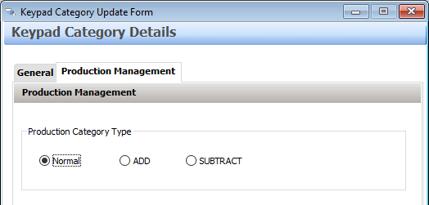
Categories will need to be created to house the new Production Ingredient PLUs. It is recommended that consideration be given to the naming convention of these categories so as not to create confusion. Prefixing the category name with i- (for ingredient) works well. For example, the category containing the production ingredient PLUs for item to be produced at the grill could be “i-Grill”.
For compatibility with QSO mode programming, the Keypad category will also need to be designated as either a ’normal’, ‘add’ or ‘subtract’ category. The subtract designation is important – it means that if Bacon is removed from an item during the sale, a ‘- bacon’ ingredient can also be applied to remove it from the production job.
To assign the correct designation, go to the Production Management tab and choose the relevant Production Category Type.
Create and Assign Production Ingredient PLUs
The next step is to create the PLUs which will be the Production Ingredient PLUs. These PLUs will then be assigned as the production ingredients within the parent PLUs.
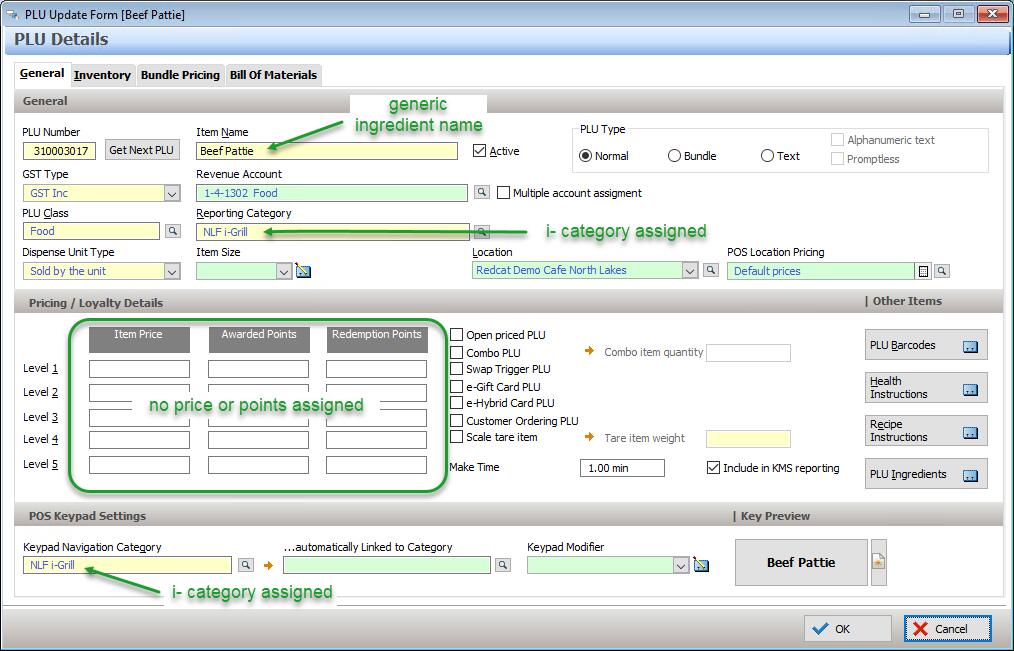
Create the Production Ingredient PLUs as you would normal PLUs ensuring that they are grouped in the correct ‘i-‘ category. The names will be those of the generic ingredient needed by the production staff in the kitchen, eg Beef Pattie or Chicken Breast.
Production Ingredient PLUs will not contain any price or loyalty point information.
Assign Categories to Relevant Roles
For the POS to be able to successfully make the substitution of Production Ingredient for PLU item, both categories (ie. Burgers and i-Burgers) must be assigned to the target Roles.
Ensure that all relevant categories are assigned to all relevant Roles and send an update to the POS.