Introduction
Polygon Back Office complies with the standard double entry method of book keeping. The system has been designed so as to make it useable by people with limited book keeping and computing knowledge. The term “Chart of Accounts” is simply an expression for describing the structure of the accounts into which you record your financial transactions.

From Polygon Back Office, Click on the Accounts Ledger button on the toolbar at the top of the window, or, Select Accounts from the main menu then select Chart of Accounts.
|
Polygon Back Office provides three levels of accounts:
1. The first level, Account Type, comprises six standard categories which are set and cannot be altered. They are;
•Revenue;
•Expense;
•Cost;
•Assets;
•Liabilities;
•Equity.
2. Within each of the above categories you may set up any number of Account Groups;
3. Within each of the Account Groups you set up you may set up any number of Accounts.
For example, within the Category “Expenses” you may have set up an Account Group called “Utilities” and within this group you may have set up the following expense accounts:
•Telephone;
•Gas;
•Electricity.
As a result, when you print your financial reports all items will be grouped and totalled in a manner which will make the reports easy to understand. Polygon Back Office is installed with a number of pre-defined Account Groups and System Accounts which are required to automate a number of business functions. You cannot alter or delete these Account Groups or Accounts but you can add any number of Account Groups and Accounts to meet your particular needs.
If you have purchased a multi-department license, you are able to create multiple departments within your software and allocate specific revenue, expenses and costs to those departments. You can therefore obtain financial reports such as profit & loss on specific departments. The system ships with a default department called ‘Admin’. This department acts as the ‘master file’ for all other departments. Please note: all Account Groups and Accounts are created in the Admin department and can then be ‘exported’ to other departments if required. See section Departments File to read more about Departments. Note: If you have not purchased a multi-department license, the only department you can work in is ‘Admin’. The system will not allow you to create any additional departments.
|
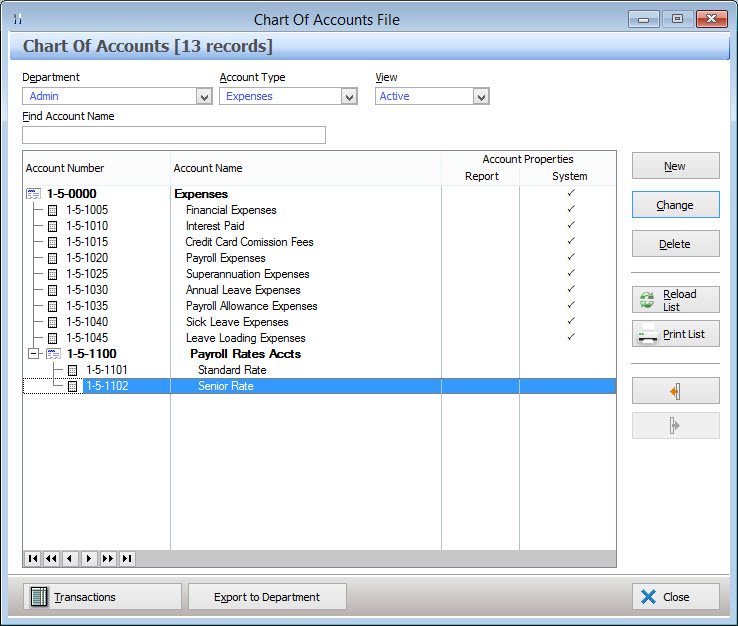
When the Chart of Accounts is loaded, the default ‘Admin’ department is displayed. If you have purchased a multi-department license you are able to work with multiple departments. You may choose another department from the pull down list if desired. You may select the ledger category you wish to access by choosing one from the pull down box labeled Account Type – the choices presented are Assets, Liabilities, Equity, Revenue, Expenses, Cost.
You will see the current account structure for the selected category presented as a ‘tree’. The tree is represented in levels.
•The top level is the Account Type.
•The second level is the Account Group.
•The third level is the Account.
The following account management options are available from the Chart of Accounts File: •Create Account Group - Select the Admin department, select the Account Type of this account group. From the tree list, highlight the department or an account group (shown in bold) and click the New button. The Ledger Account Update form will be displayed. Set the Account Posting Level to "Header - Non Postable" and enter the details of this account group; •Create Account - Select the Admin Department and click the New button. The Ledger Account Update form will be displayed. Set the Account Posting Level to "Detail - Postable" and enter the details of this account; •Deleting Accounts - Accounts can be deleted by highlighting them and clicking the Delete button. Note: System Accounts, Accounts which have been exported to other departments and accounts with recorded transactions can't be deleted; For Multi-Department Users – Remember you may delete an Account from any department – you are not restricted to the Admin department. •Deleting Account Groups - Account Groups can be deleted by highlighting them and clicking the Delete button. Note: You cannot delete System Account Groups (the Account Groups used by the system) or Account Groups to which Accounts are attached. Multi-Department Users - You cannot delete an Account Group from the Admin department which has been exported to another department. You may delete an Account Group from any department – you are not restricted to Admin; • Account Transactions - To view account transactions for an account, highlight the account and then click the Transactions button at the bottom of the form. This will load the Ledger Account Transactions form; •Reload List - This button is useful if you have a multi-user license where more than one user can access Polygon Back Office at a time. Click this button to update the list with any changes made by other users such as newly created or recently deleted accounts; •Print - Click this button to generate a report showing the details listed in the Chart of Accounts form. This report can be saved, printed or converted to CSV format which can be opened with spreadsheet programs; •Removing an Account from an Account Group - To remove an account from an account group, highlight the account and click the Indent Account Up One Level button. Note: This will remove the selected account and any accounts below this account which belong to the same group; •Adding an Account to an Account Group- If an account is immediately below an account group or accounts which belong to an account group, the account can be added to the group by highlighting the account and clicking the Indent Account Down one Level button.
|


To search for an account or account group within the selected department and account type, type all of, or, part of the item's name into the Find Account Name text box. The system will highlight the first account which starts with the search text or the first account which contains the search text.
|
Once you have created your required Account Groups and Accounts in the Admin department they can then be exported to other departments. (Please see section Department Accounts File for information explaining how to create a new department.) Please note: This functionality is only available if you have purchased a multi-department software license and are registered for multiple departments. You can export either: •The whole Ledger Category (including all Account Groups and Accounts); •A selected Account Group (including all the Accounts within that group); or •A selected Account (please note this will export the Account Group and only the selected Account). Handy Hint: It is often the best option to export the whole Ledger Category or Account Group and then delete the Accounts which are not required.
Exporting an Accounts and Account Groups To export an Account or Accounts, Select the Admin Department (Accounts can only be exported from the Admin Department), There are three ways to export accounts to another department: 1.Select the Account Type (to export all accounts and account groups in this category), or, 2.Select an Account Group to export this group and all categories belonging to this group, or, 3.Select an individual Account to export this account only.
After you have made your selection click the Export to Department button at the bottom of the form, This will load the Departmental Export - Chart of Accounts form which allows you to specify which departments to export to.
|
See Also:
Polygon Back Office > Ledger Account Transactions
Polygon Back Office > Accounts