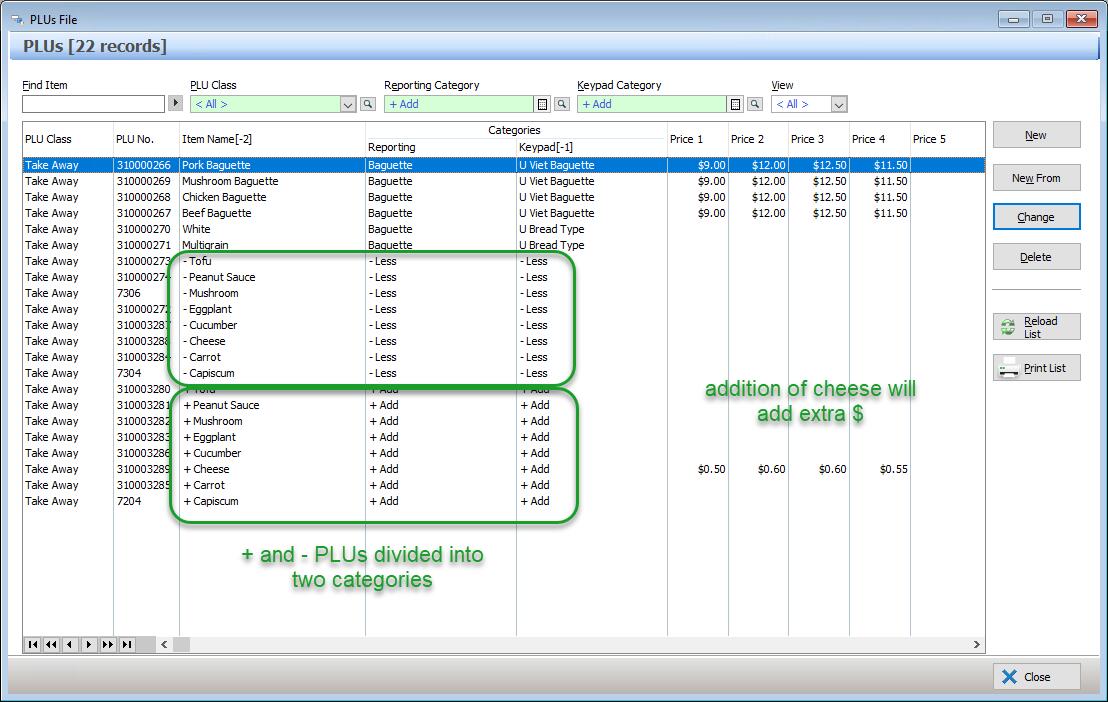
The first step in programming QSO mode is PLU creation. There are two different types of PLU’s – Parent and Ingredient.
Parent PLU’s
These are PLU’s that will have ingredients assigned to them.
Ingredient PLU’s
These PLU’s are all the available ingredients that can be assigned to Parent PLU’s.
For example, if you are using QSO mode for pizzas, a Parent PLU would need to be created for the pizza type (eg. Aussie) and then Ingredient PLU’s would need to be created for every single topping available (eg. + Ham, - Ham, + Cheese, - Cheese etc.).
Important requirement
Two (2) PLU’s need to be created to allow for every ingredient to be added, subtracted or swapped during the order taking process using QSO mode.
One PLU to add the topping needs to be created with the prefix ‘+’ (eg. + Cheese), and another PLU to subtract the topping needs to be created with the prefix ‘-‘ (eg – Cheese).
Note:
When creating PLU’s for required choice ingredients, you do not need to use the + and – prefix when entering the ingredient name in the description field.
Handy Hint:
When creating these Ingredient PLU’s it is easiest to separate them into two different categories and to take pricing into consideration – see example below: