Reconciling Your Bank Accounts
Polygon Back Office provides full Bank Account Reconciliation functionality that:
•Ensures all transactions have been entered in your Bank Accounts File;
•Tags deposits and withdrawals which have been received (cleared) by the Bank;
•Tags deposits and withdrawals which have been included in a reconciliation;
•Confirms that both your figures and the figures provided by the Bank match.

From Polygon Back Office, Access the Bank Accounts File by clicking the Bank Accounts button on the toolbar, Highlight the Bank Account which you wish to reconcile, Then click the Reconcile Account button at the bottom of the form.
|

Review Listed Transactions
Upon receipt of your bank statement, review the listed transactions and enter any that have not yet been recorded (such as account fees, interest, periodical payments etc) using the Bank Account Transactions File.
To view a transaction list for the selected bank account, the following information must be entered: •Bank Statement To - Enter the date of your bank statement. The transaction list will show transactions up until this day; •Bank Statement Balance - Enter the balance listed on your bank statement.
Filters The transaction list can be filtered by Transaction Type, Cleared Status and Reconciled Status. Select any filters to which you want to apply and then click the Get Records button to view the transaction list. •Transaction Type Filter - The transaction list can be set to show All Transactions, Bank Transactions, Client Invoice Receipts, Journal Entries Payroll Payments, Supplier Invoice Payments, Virtual Safe Deposits or a combination of these transaction types. Click the browse button •Cleared Status Filter - The transaction list can be filtered to display a subset of transactions based on their cleared status. Select one of these values from the Cleared Status filter, All, Not Cleared, Cleared, Outstanding Cheques/Withdrawals or Outstanding Deposits. •Reconciled Status Filter - The transaction list can be filtered to display a subset of transactions based on their reconciled status. Select one of these values from the Reconciled Status Filter, All, Not Reconciled, Reconciled.
When you have selected the desired transaction filters, click the Get Records button to update the transaction list.
|
 to select which transaction type(s) you wish to filter by.
Once all transactions have been reviewed, transactions can be marked as cleared. Clicking the Toggle Clear Txn Status button at the bottom of the form will mark any selected transactions as cleared. Cleared transactions are identified with a tick in the "C" column at the left of the list. To mark a number of transactions as cleared at once, tick the Multi-Select tick box at the right of the form, then click on each transaction you wish to mark as cleared. Finally click the Toggle Clear Txn Status button at the bottom of the form. All selected transactions will marked as cleared.
Keyboard Entry Transactions can be highlighted and marked as cleared using the keyboard. This can be quicker than using the mouse to select each item. Follow these steps to mark bank accounts as cleared using the keyboard: •Enable multiple selection mode by pressing the hot key Alt + M on the keyboard; •Use the tab key (or the mouse) to select the transactions list. The transactions list is selected when a dotted outline is shown around one of the listed transactions. This dotted outline can be moved up and down the list using the Up and Down buttons on your keyboard. To highlight a transaction hold the Ctrl key and press the Space key on your keyboard. (A highlighted transaction can be de-selected by pressing Ctrl + Space again). Repeat this process until all the transactions which you wish to mark as cleared have been highlighted. •Press the Space bar on the keyboard (without holding the Control Key) to toggle the cleared status of all highlighted transactions. This means any highlighted items which had a tick in the cleared column will be un-ticked and any items which didn't have a tick in the cleared column will now be ticked.
Total Balances Balances of currently outstanding cheques/withdrawals and outstanding deposits are displayed displayed in BLUE. The resulting balance is compared with the Polygon Back Office balance of the account at the same date. Any difference in your reconciliation is shown in the Difference text box. If the difference is 0.00 a GREEN tick mark will be displayed and you are now ready to print and process the reconciliation.
If Your Account Doesn't Reconcile: If there is a dollar value difference in your reconciliation a RED cross mark will be displayed. This indicates that the account doesn't currently reconcile. Review the account transactions and check for any missed transactions which may not have been entered or which may need their cleared status to be changed to cleared or un-cleared.
If Your Account Reconciles: If you are displayed a GREEN tick mark, your account reconciles. Choose the Print button and print your reconciliation report for your records. Please note – You must print this report now if you wish to retain a hard copy, it cannot be retrieved and printed at a later date.
Now click the Tag Account as Reconciled button and confirm your action by clicking the Reconcile Account button. The "R" column at the left will display a tick to indicate that these transactions have been included in a reconciliation process. If you try to change these transactions in the future, you will be advised that they have already been reconciled and that proceeding with the change will affect your reconciliation. Choose the Close button to exit the reconciliation screen.
|
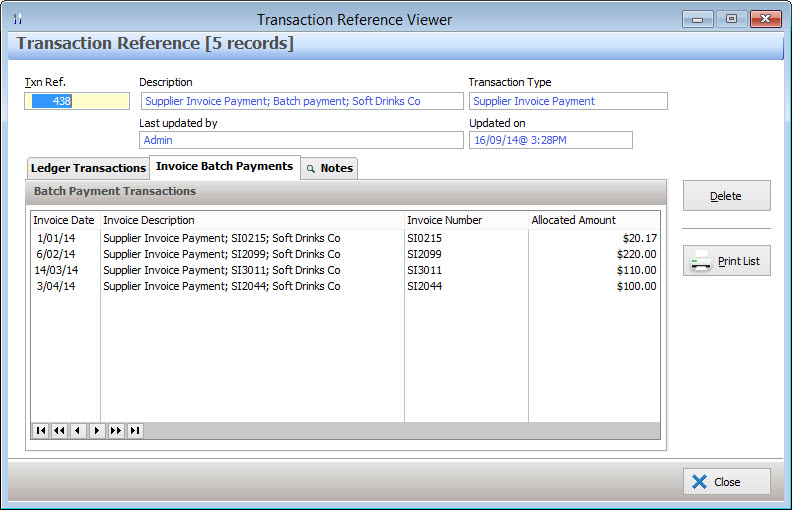
Client or supplier invoices have been settled as a batch will be recorded as one bank transaction even though they affect multiple invoices. These items include the text "Batch Payment" in the description column of the bank reconciliation transactions list. To view additional information about the invoices which were affected by this batch payment, highlight the transaction and click the Change button. A message will be displayed asking if you would like to view the batch payment in the reference viewer. Click the Yes button.
The selected batch payment will be shown in the reference viewer. Select the Invoice Batch Payments Tab to view: •Invoice Dates; •Invoice Descriptions; •Invoice Numbers; •Payment Amounts. Please note: These transactions may not be modified, they are simply displayed for your information. To remove the batch settlement click the Delete button.
|
See Also:
See section Bank Account Transactions for more information about recording bank transactions.
Getting Started with Polygon Back Office
Polygon Back Office > Bank Accounts
Polygon Back Office > Accounts
Polygon Back Office > Reference Viewer