Polygon Back Office allows you to keep control of all bank transactions - payments, deposits, cheques, credit cards, loan accounts and investment accounts. The bank accounts file lists all the bank accounts which have been recorded in Polygon Back Office. From this form you can add new accounts, edit existing accounts, access account transaction management features and access bank reconciliation features.

From Polygon Back Office, Click on the Bank Accounts button on the Toolbar, or, Select Accounts from the main menu, then select Bank Accounts.
|
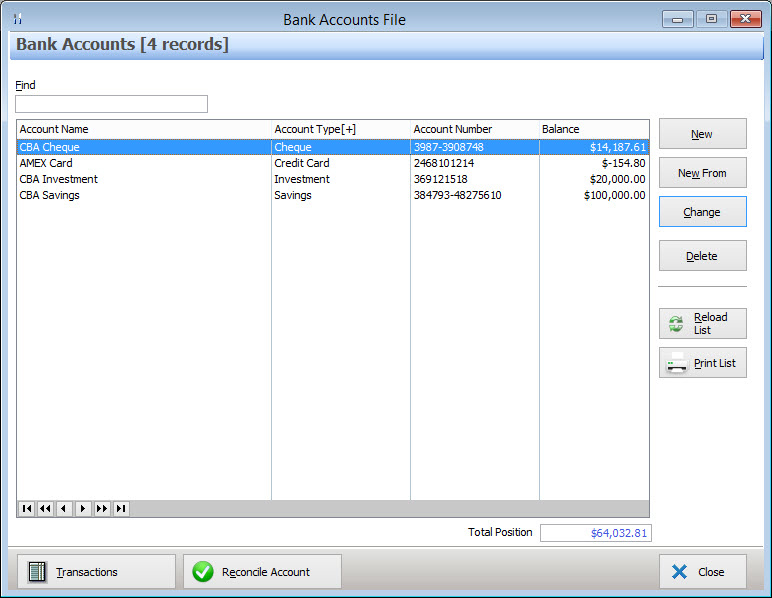
The following options are available from the Bank Accounts File:
•New - To create a new Account entry click the New button. This will display the Bank Account Details form which allows you to enter the details for the new account. Available account types are Cheque, Credit Card, Investment, Loan and Savings;
•New From - To create a new Account based on an existing Account, highlight the existing account and click the New From button. This will display the Bank Account Details form which allows you to enter the details for the new account;
•Change - To modify an existing bank account, highlight the account and click the Change button. This will display the Bank Account Details form which allows you to edit the details for the selected account;
Note: Once a bank account has been created, its Account Type is not changeable. If transactions have been entered against an account, its Account Number is not changeable.
•Delete - To delete an existing account, highlight the account and click the Delete button.
Note: You cannot delete bank accounts and credit cards if they have related transactions recorded in the system.
•Transactions - To view, add or modify transactions for an account, highlight the account and click the Transactions button. This will show the Ledger Account Transactions File with a filter set to display transactions for this account only. From here you can create and manage transactions for this Bank Account;
•Reconcile Account - To perform a bank account reconciliation, highlight the desired bank account, then click the Reconcile Account button. This will show the Bank Reconciliation Details form which provides reconciliation options.
•Find - To find an Account in the current list, type part of or all of the account's name into the find box.
•Reload List - This button is useful if you have a multi-user license where more than one user can access Polygon Back Office at a time. Click this button to update the list with any changes made by other users such as newly created or recently deleted items;
•Print List - Clicking this button will generate a printable report showing the accounts which are currently listed in the Bank Accounts file. This report can be saved, printed or converted to CSV format which can be opened in spreadsheet programs.
A number of bank account related reports are available from the Polygon Back Office Reports section. See section Reports > Polygon Back Office > Banks for more information about these reports.
See Also:
Polygon Back Office > Bank Account Transactions
Polygon Back Office > Accounts
Getting Started with Polygon Back Office