Configuring Budgets for the Chart of Accounts provides additional reporting insight using Profit & Loss and Balance Sheet reports. Budget amounts can be entered against each ledger account individually and/or populated by the system using actual or budget data from the previous year.

From Polygon Back Office, Select Accounts from the main menu, Then select Chart of Accounts Budgets.
|
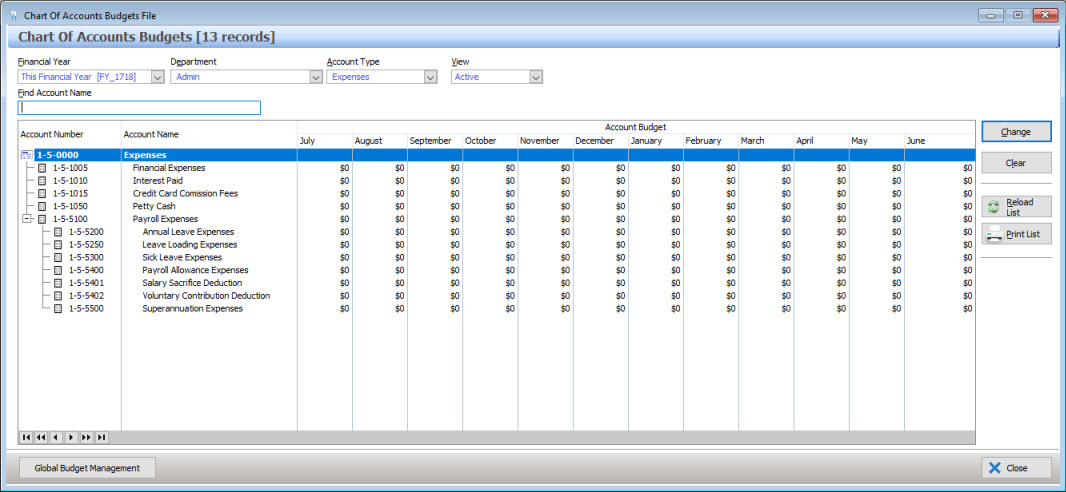
The following options are available for the Chart of Accounts Budgets File:
•Financial Year Selection - Choose the financial year for which you wish to configure the budget amounts;
•Selection Criteria - Select the Department and Account Type for which you wish to configure the budget amounts;
•Filtering - The accounts can be filtered to display only Active, Inactive or All ledger accounts. Select which accounts to include from the View list box at the top of the form;
•Search - To search for a ledger account, type part of or all of the account name into the Find Account Name box at the top of the form;
•To Edit Budget Amounts - To set or adjust the budget amounts against an account, highlight the account and click the Change button. This will load the Account Budget Details form where you can enter the budget amounts for each month of the selected financial year;
•To Reset Budget Amounts - Highlight the account, then click the Clear button. The budget amounts for each month will be reset to zero;
•Reload List - This button is useful if you have a multi-user license where more than one user can access Polygon Back Office at a time. Click this button to update the list with any changes made by other users;
•Print List - This button generates a PDF report showing the currently displayed budget data. The report can be printed, saved or converted to CSV format. For more information about reports see section Reports;
•Global Budget Management - Use this form to configure budget amounts against all ledger accounts at once using previous year figures. See section below for further instructions.
Once figures are entered across each Account Type, budget data is ready for use within Profit & Loss and Balance Sheet reporting.
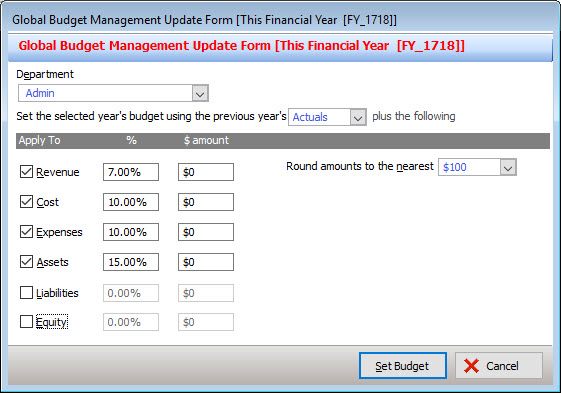
Press the Global Budget Management button to access the following form;
To set the budget data as a bulk update, complete the following steps •Select the Department to be configured; •Select the previous year data to be used, Actuals or Budget figures; •Tick the boxes next to the Account Types to be updated; •To add to the previous year figures during the update, enter either a % or $ amount for each Account Type; •Select the desired rounding amount for the updated budget figures; •Press Set Budget to apply the configured amounts
HANDY HINT: To apply different settings to some Account Types, the form can be completed multiple times. For example: 1. To use Actuals data and no rounding for Revenue and Cost accounts, place ticks beside Revenue and Cost only, complete the form and press Set Budget. 2. Then to use Budget data and round to nearest $100 for all other account types, place ticks beside Expenses, Assets, Liability and Equity only, complete the form and press Set Budget.
|
See Also:
Polygon Back Office > Account Budget Details