The POLYGON PAYROLL module reached end of life on 30 June 2021 and this was communicated to all clients licensed with this module.
This module is no longer supported.
Historical transactions may be accessed although entry of new payslips is no longer possible.
Polygon Payroll allows a list of public holidays to be recorded so that public holiday rates can be applied when staff work on these days. The Public Holiday Dates File allows you to add, change and delete public holidays from this list. When entering an employee timesheet for a week which includes a public holiday designated in this file, Polygon Payroll will ask if the employee would normally work this day. If you choose “Yes” and if no shift times are entered for the day, Polygon Payroll will pay the day either at normal rates. If you choose "Yes" and if shift times have been recorded for this day, public holiday rates will be paid for shift hours for the day. If you choose “No”, Polygon Payroll will take no action unless hours are entered on the day.
Make sure that you keep the Public Holiday Dates File up to date since many holiday dates vary from year to year.

From Polygon Back Office, Select Payroll from the main menu, then select Public Holidays.
|
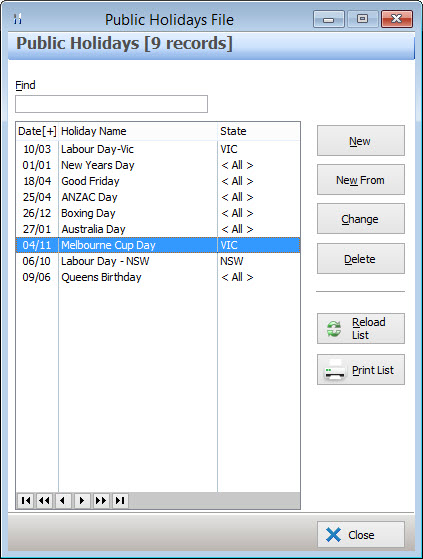
The following options are available from the Public Holidays file:
•To record a new Public Holiday - Click on the New button. This will load the Public Holiday Details form where you can enter the details of the Public Holiday;
•To edit an existing Public Holiday - Highlight the Public Holiday and click on the Change button. This will load the Public Holiday Details form where you can change the details for this Public Holiday;
•To delete an existing Public Holiday - Highlight the Public Holiday and then click on the Delete button then click Yes to confirm the deletion;
•Reload List - This button is used in multi-user installations where multiple users may be entering data at the same time. Clicking this button will refresh the displayed data and show any changes made by other users;
•Print - This button generates a printable PDF report which shows the Public Holidays list currently shown in this file. This document can be saved, printed or converted into a CSV format;
•Find - To search for a particular Public Holiday, type part of, or all of the Public Holiday's name into the Find box.
See Also:
Public Holiday Rates can be assigned from the Polygon Payroll > Payroll Rate Details form
Polygon Back Office > Polygon Payroll > Getting Started
Polygon Back Office > Polygon Payroll > Using Polygon Payroll