How to Configure a Product with Bill of Materials
The PLU for a main menu item must have the below configuration:
1.Keypad Modifier set (eg. Reg or Lge) for items that are sold in more than one size
•The Keypad Modifier name must exist as part of the Item Name
•The rest of the Item Name must match across each size of this product

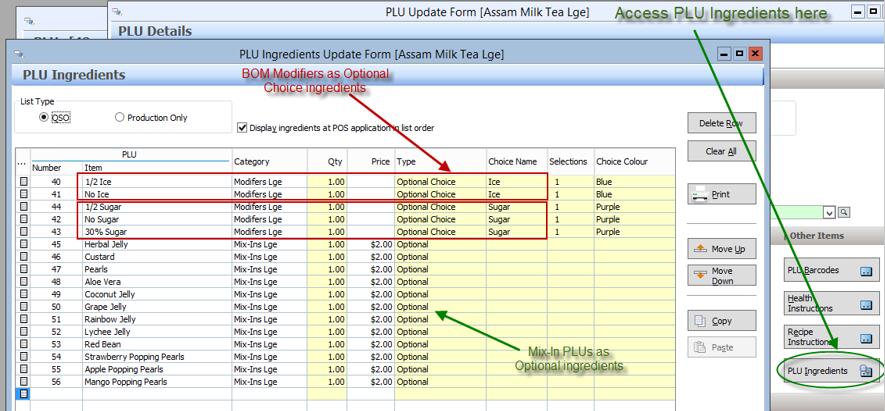
2. PLU Ingredients File
•Add the BOM Modifier PLUs to the list, as Optional Choices grouped by Choice Name
•Add the Mix-In PLUs as Optional ingredients
3. Base Ingredient Headers
Before configuring the PLU Bill of Materials matrix for this PLU, go to the Bill of Materials tab and define the matrix column headers in the Base Ingredients list:
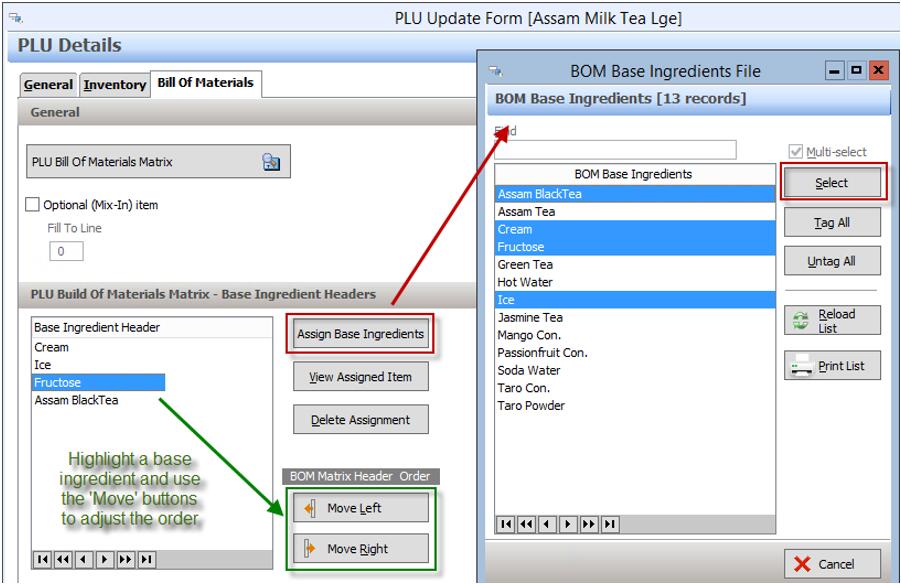
IMPORTANT NOTE:
The order of the Base Ingredient Headers defined for a PLU, controls the order in which they will print on the docket at POS. Use the Move Left / Move Right buttons to adjust the order of the column headers, and hence the print order.
4. PLU Bill of Materials Matrix
Go to the Bill of Materials tab, click PLU Bill of Materials Matrix button:

When filling out the Bill of Materials Matrix, the following shortcuts are available to speed up data entry:
1.Copy / Paste buttons
-Press Copy on a table, go to another Line option
-Press Paste to populate the table, then adjust as required and press OK to save
2.ENTER key
-Select a value in a cell, press ENTER to move to the next cell down
-Press ENTER again to fill the cell with the same value as above
3.Use Right click
-Click on a cell
-Right click and select Copy Down to fill this column down from the selected cell with the same value
-Right click and select Clear Down to clear this column down from the selected cell
4.Clear button
-Press the Clear button to clear all data from the current table
-Press Yes to confirm
5.New From button in the PLU File
-Highlight an existing PLU to be copied from
-Press New From and complete the Item Name
-Go to the Bill of Materials tab, check the Base Ingredients and adjust as required
-Go to the PLU Bill of Materials Matrix and adjust as required
-Press OK to save