Optional Ingredients (Mix-Ins) Setup
How to access:
In Polygon POS Management, go to Products, highlight Build of Materials (BOM), select Optional Ingredients.
The Optional Ingredients file is a list of existing instructional PLUs.
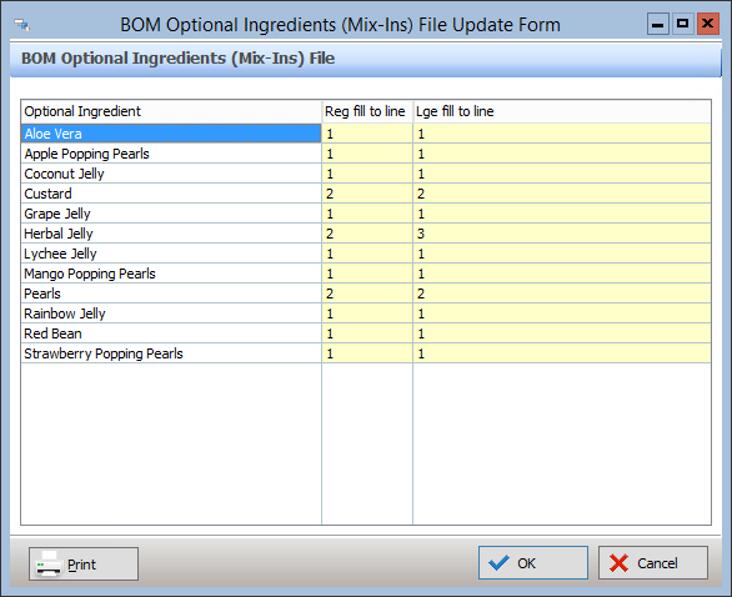
It is populated automatically with whichever PLUs have the ‘Optional item’ box ticked in the Bill of Materials tab:
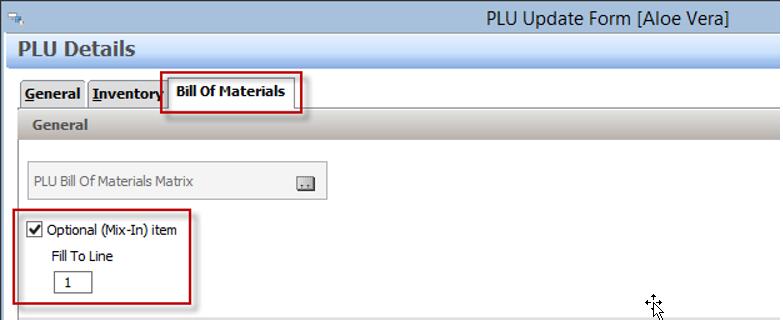
The Fill To Line setting is entered on the PLU at the time of setting it up. This value can also be changed within the Optional Ingredients file above. It will be updated in both places.
Optional Ingredients PLUs should be duplicated for each required size using the Keypad Modifier setting on the PLU.