This form allows you to enter the general details of a new or existing Management Account.

From Polygon POS Management, Access the Management Accounts File by clicking the Management Accounts button on the toolbar, then either, Click the New button to create a new Management Account, or, Highlight an existing management account and click the Change button to modify the selected account.
|
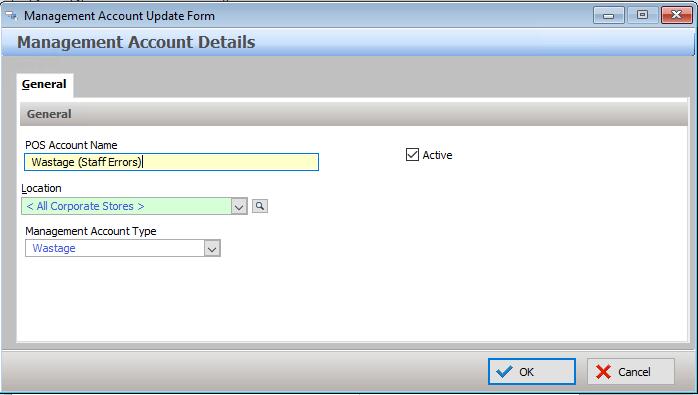
The following details can be entered:
Account Name - Enter the name of this management account;
Active - This box must be ticked whenever you wish to have the management account included as part of the “active accounts” at the Terminal. If this box is not ticked, this management account will be considered inactive and will not be usable because it will not be known to the POS Terminal.
Location - If you have a multi-location license, a management account can be limited to only be accessible from one or more locations. To select which locations this account will be accessible from, click the browse button  . This will load the location file pick list. Highlight the desired location(s) and click Select.
Management Account Type - choose from:
•Other
•Loyalty Points Redemption
•Wastage
Related Reports:
The following two reports are available from Polygon POS Management > Reports menu which detail management account activity between two given dates.
Polygon POS Management Reports > Admin > Management Account Charges
Polygon POS Management Reports > Admin > Management Account Charges [Detailed]
See Also:
Polygon POS Management > Management Accounts File
Polygon POS Management > Management Account Charges File
Getting Started with Polygon POS Management