This section describes how to enable the Redcat MYOB interface, and how GL accounts should be created and mapped in Polygon Back Office to ensure correct posting of GST figures for BAS reporting.
The initial setup, authorisation and ledger mapping will be provided as part of Redcat’s installation process in consultation with the client. The following information is provided for your review and future reference.

The integration between Redcat Polygon and MYOB creates a mapping between the Chart of Accounts in each program, including instruction on which GST types are relevant to each account. Information contained within the sales reset from the POS is posted to MYOB when the reset is processed in Polygon POS Management in the form of a Transaction Journal – for users running perpetual stock this will include the Asset | Cost journal relevant to stock decrementation.
|

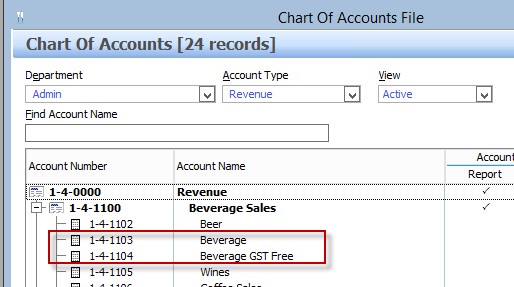
To correctly deal with GST when mapping revenue to feed into MYOB, the setup of Revenue Accounts and PLUs in Polygon POS Management must follow these rules: 1.PLUs that are set up with GST Type: GST Free, must be mapped to a separate Revenue Account to items set up as GST Type: GST Inc 2.To assist with mapping, include ‘GST Inc’ or ‘GST Free’ in at least one of the Revenue Account names in Chart of Accounts File:
EXAMPLE PLUs:
|

If there are Paid Out transactions included in your POS resets the integration may also need to pass expenses or costs to MYOB. To correctly deal with GST when mapping expenses\costs to feed into MYOB the setup of Expense Accounts and Paid Out keypad If there are Paid Out transactions included in your POS resets the integration may also need to pass expenses or costs to MYOB. To correctly deal with GST when mapping expenses\costs to feed into MYOB the setup of Expense Accounts and Paid Out keypad buttons in Polygon POS Management must follow these rules: 1.Clients utilising multiple Paid Out buttons that are set up deal with specific GST Types, must be mapped to a separate Expense Accounts for GST Inc or GST Free. 2.To assist with external account mapping, include ‘GST Inc’ or ‘GST Free’ in the Expense Account names in Chart of Accounts File
Please note: this does NOT mean that the revenue and/or expense accounts must also be separated in MYOB, ie. you can map both the Beverage and Beverage GST Free revenue accounts in Polygon to the same revenue ledger account in MYOB. |
The progression to successful integration will be much smoother if you understand all the elements involved before you start the mapping process. Collect the list of accounts. It is recommended that you run the following reports to help you determine which ledger accounts will need to be mapped, and if you need to make any changes within Polygon POS regarding the considerations in the sections above. •PLU List by PLU Class (this will show both the revenue account assigned and the GST Type of each PLU, check that any GST Free PLUs are assigned to revenue accounts separate your GST Inc items) •POS Media Log (to determine which media types need to be mapped) •Sales by Revenue Account (to determine which revenue accounts need to be included in the mapping) •Paid Out Report (to determine if expense/cost accounts need to be included in the mapping. •Stock items List (if you are using Polygon Inventory you will need to know which asset and cost accounts are attached to stock items)
Note: Polygon users who process Client Account charges at POS are advised to map the Polygon ‘Accounts Receivable’ Asset account to a generic clearing account in MYOB. For example: ‘POS Client Charges’, ‘POS Client Clearing Account’ or something similar. This is because the integration will send account charges as a transaction journal and client invoices will not be created in MYOB. You would then enter the relevant client invoice in MYOB as required, against this clearing account.
Determine the GST Implications. When each ledger account is mapped, the GST type that will be assigned to transactions sent from that account must also be assigned. The default GST types accepted by MYOB are: •GST •FRE •N-T
Generally: Asset and Liability accounts have no GST implication (N-T). While Revenue, Expense and Cost accounts are affected by GST (GST and FRE). Please note: If you are running Polygon Inventory a perpetual stock decrementation will be processed as part of the reset. This movement between asset and cost has NO GST implication so N-T should be chosen for the asset and cost accounts that are assigned to stock items. This table can be used as a guide.
|
Redcat Operations or Support staff will facilitate the setup of the correct modules and walk you through the process to authorise the authentication between Redcat Polygon and MYOB. As part of the installation process, they will also facilitate the following settings and programming. We have included them here for your information and future reference. Polygon POS Management setup: 1.In POS Management, go to Application Settings, tick ‘Enable the Polygon Central Framework’ 2.Go to Web Reporting > Polygon Central and ensure Polygon Central server address is configured
3.Go to MYOB Interface > General. Tick ‘Enable the MYOB interface module’
1.In the MYOB tax codes field, enter the GST tax codes recognised by MYOB, followed by pipe separators. These will then be available from the External Tax Code drop down list when mapping. FRE|GST|N-T 4.Interface API root URL: /api/v1/interfaces/myob
5.GL posting URL: /api/v1/interfaces/myob/sync
6.Press the select icon next to Polygon/MYOB GL account assignment.
7.Press the select icon in the left column, this will display a list of MYOB accounts for this client, which are retrieved via API. [NOTE: if an access error is displayed at this point, then Redcat Polygon Central could not connect to MYOB. Please contact the HelpDesk on 1300 4 73322 for assistance in resolving this error.] 8.Select the relevant MYOB account, set the correct tax code for this account, then select from the right-side list to apply the corresponding Redcat GL account 9.Continue until all relevant accounts are mapped, press OK to save.
|


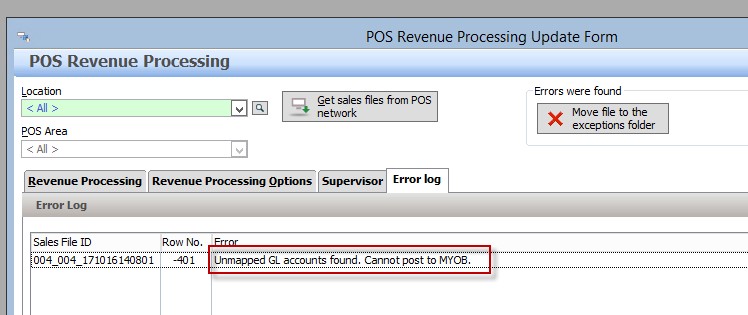
With the module correctly enabled, posting from Redcat to MYOB will occur automatically when sales resets are processed in the Revenue Download screen or via the auto-download and processing service. If a Redcat account is detected in the GL Reference of a sales reset, which has not been mapped to an external MYOB account as per section above, the following errors will be displayed specifying the offending account(s):
The reset will not be processed in Polygon POS Management until this is rectified. Follow steps above to map the account correctly. Then return to Revenue Download to attempt the process again. |

If for any reason you desire to amend/reprocess a reset in Redcat Polygon, you will need to ensure that the relevant transaction journal(s) in MYOB are also removed prior to the resend so as to safeguard against overstating of revenue figures. 1.Identify the relevant transaction journal(s) created by this sales reset in MYOB 2.Delete the relevant transaction journal(s) from MYOB 3.Contact Redcat Support to perform the reset correction in Polygon POS Management (if required) 4.Re-process the corrected reset 5.Verify the correct result in MYOB |
See Also: