To streamline the process of paying suppliers, Polygon Back Office includes a direct entry payroll feature which generates a Direct Entry file. This file can sent to a financial institution web site which then make the appropriate payments to your suppliers.
Passing Direct Entry Supplier Payments to your Bank
When all direct entry supplier payments have been recorded in Polygon Back Office;
•Access the Reports File by clicking the Reports button on the toolbar;
•Highlight the Direct Entry File - Suppliers report under the Financial heading and then click the Select button;
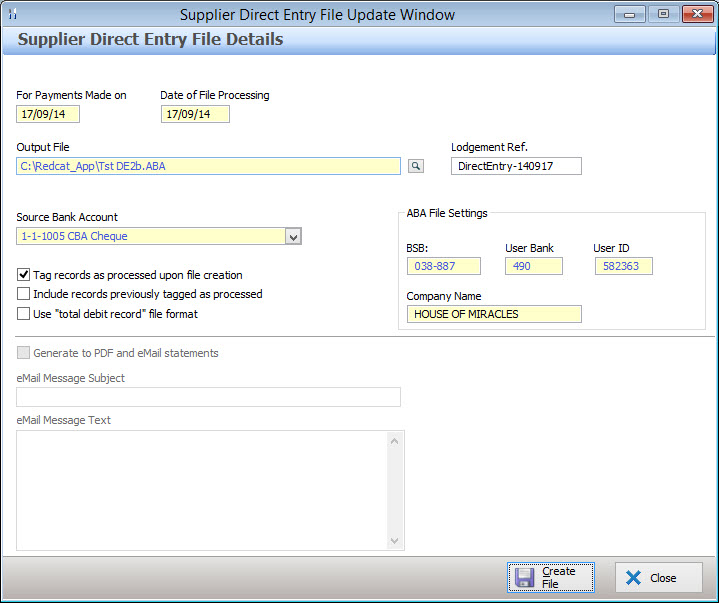
The Supplier Direct Entry File Details form will be displayed
•Enter the payments date in the For Payments Made On field. New supplier payments recorded with this date will be included in the direct entry file.
•Enter the date for payment processing by the Bank in the Date of File Processing field. This is the date which the transfer will be made. Note: Not all financial institutions use this date.
•Using the browse button  at the end of the Output File box, navigate to where you wish to save the direct entry file;
•If you place a tick mark in the Tag records as processed upon file creation box the system will remember that these payments have already been included in a direct entry file.
•If you place a tick mark in the Include records previously tagged as processed box the system will include all relevant payments regardless of whether it believes that they have already been included in a payment file.
•If you require the Lodgement Reference (which the bank uses to describe your payment on the supplier bank statement) to be something other than the default reference of ‘PAYMENT” please enter it here. Note, this reference may not be longer than 18 characters.
•Some banks require an extra line in the format of the output file. If your bank requires this total debit record, please place a tick mark in this box. Ticking Use ‘total debit record’ file format tick box, creates a file version supported by smaller institutions such as Bank West. If you are using a major bank such as ANZ, CBA, NAB, Westpac, this option should not be ticked.
•Select the Source Bank Account which payments will be made from;
ABA File Settings
•BSB, User Bank and User ID - When a bank account is selected, these settings are automatically entered on this form, they are filled from the details saved in the Bank Account Details Form. If changes need to be made to this information, these details can be changed from the Bank Account Details form.
•Company Name - Enter the company name which will be shown on these transactions;
•Press the Create File button to create the supplier payments file in the location you have chosen in ABA format which can then be sent to the bank.
See Also:
Polygon Back Office > Supplier Transactions File
Polygon Back Office > Bank Account Details
Getting Started with Polygon Back Office
Polygon Payroll > Paying Employees Electronically - Direct Entry Files