To successfully implement swap trigger PLUs for use with QSO you need to:
•Create Parent PLUs (including PLU Ingredients)
•Create Ingredient PLUs (including relevant production ingredients)
•Turn on the Swap Trigger flag and build the Swap Items List.
For full details on programming for QSO Mode please refer to the Quick Service Ordering Mode (QSO) section.

The parent PLU will be programmed for QSO Mode with a PLU Ingredients conversational ordering build list containing relevant Option Types, Choice Names and Selections.
In the example below the Classic Combo Deal is programmed for conversational ordering which requires the selection of a Protein, the Bread Type, a Side and a Drink.
|

Ingredient PLUs in the above build list will have the relevant production ingredients assigned as appropriate. It will now be necessary to duplicate those ingredient PLUs that need to exhibit different stock links and production ingredients. While duplicating the ingredient PLUs care should be taken to ensure that you can differentiate between them, to ensure that the correct PLU can be chosen from a list. If you need three PLUs for Bun each with different production ingredients and inventory links they could be named: •Bun •Bun. •Bun: In our example of the Classic Combo Deal the Bun and Wrap ingredient PLUs have production ingredients for chicken breast and chicken tenders assigned.
However, because we need a Bun and Wrap that will have the vegan plant-based ‘chicken’ pattie (PB Chicken Pattie) as production ingredients these have been duplicated as Bun. and Wrap. Although it is not mandatory to make the item name different, the full stop at the end of the name will help identify the correct PLU when building the Swap Items List.
|
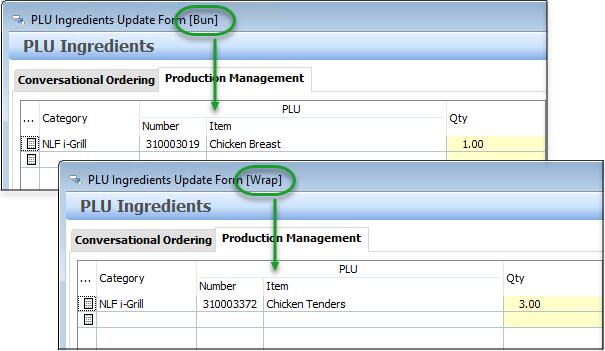

Give consideration to any PLU Modifiers you may be using. If you have ingredient PLUs programmed with modifiers assigned, you may also need to duplicate these for inclusion in a Swap Items List. In our example, if we offered the Classic Combo in small and large sizes the list of PLUs required for the bun and wrap options would look like this:
|
The PLU which causes a swap to the triggered, is called the Swap Trigger PLU and needs to be tagged accordingly. •On the General tab of the PLU Update Form, ensure a tick is placed in the Swap Trigger PLU box as shown below.
Turning on the Swap Trigger PLU option will enable an extra tab on the PLU Update Form - the QSO Swap Items List tab. •Choose the Swap Items List button and the QSO Swap Items Update Form will be launched. Source Item PLUs are those that already exist in QSO programming. •Use the pick list button in the Source Items section choose the source item PLUs from the PLU list provided. •Now choose the pick list button in the Target Items section and select the relevant Target PLU for each line. These will need to be selected individually.
|

