QSO mode is designed to streamline the way staff can process customer orders while ensuring that all detail to complete an order is recorded. With greater flexibility and the ability to easily customise an order, QSO Mode allows staff to provide superior customer service and a better overall customer experience.
A POS terminal with QSO mode enabled can operate with either POS Driven or Customer Driven focus.
To assist kitchen staff and make the production process as efficient as possible, ingredients can be programmed to print or display in a specified build order to optimise work flow.
QSO Mode may be applied in two different methods:
•POS Driven
•Customer Driven
Both apply a conversational ordering style where the information required is relayed between the staff member and the customer.
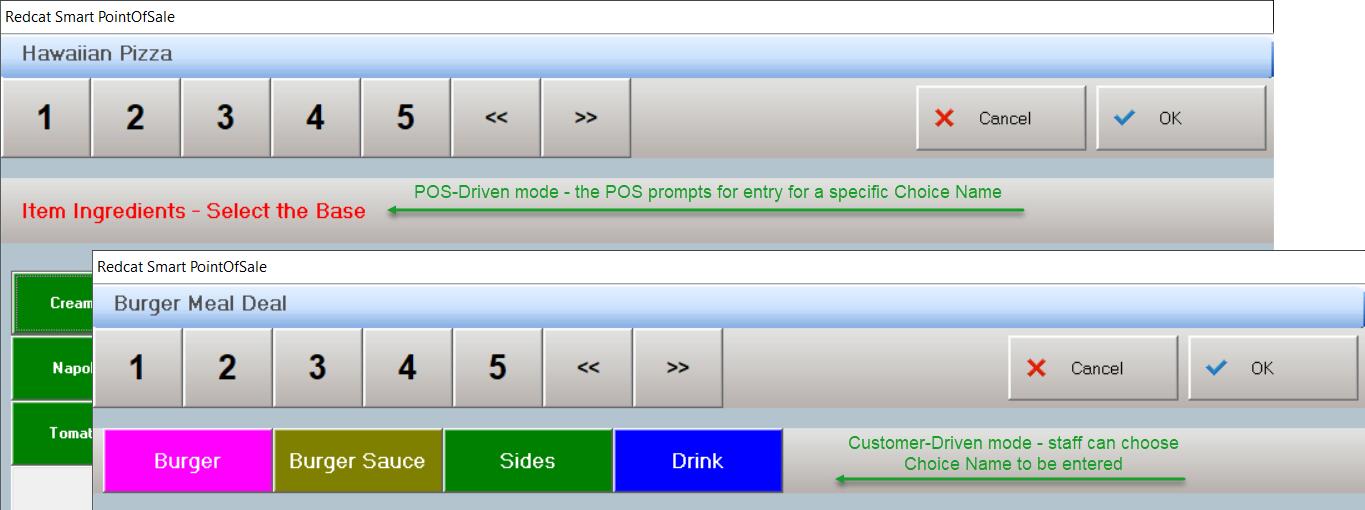
POS Driven mode means that the selection of required (and/or optional) choices will be enforced by the POS in the strict order of the PLU ingredient programming. With this mode, the POS User will be leading the conversation and asking for options and choices.
Customer Driven mode will allow entry of the required/optional choices in whatever order they may be delivered by the customer. The conversation therefore is customer led.
Note: The items will still be applied to the order and displayed on the POS in the order in which they belong. That is, if the customer asks for (and the POS User enters in the same sequence) a cheese burger and coke, with apple slaw and BBQ sauce on the burger, the POS will display them in programmed order - cheese burger, BBQ sauce, apple slaw, coke. They will also print or display on kitchen monitors in programmed order.
See Also:
Bill of Materials (BOM)
Swap Trigger PLUs