The POLYGON PAYROLL module reached end of life on 30 June 2021 and this was communicated to all clients licensed with this module.
This module is no longer supported.
Historical transactions may be accessed although entry of new payslips is no longer possible.
Single Touch Payroll Phase 2 has not been implemented.
Now that you have created your Single Touch Payroll (STP) Update file, please visit https://singletouch.com.au to upload the file.
•Log in to the portal, and then choose File Upload | CSV File Upload from the menu.

•Choose the Browse button to navigate to the location of your STP file. Once selected, choose the UPLOAD button to lodge the file.

SingleTouch will read the file and covert it to the correct format for secure communication with the ATO.
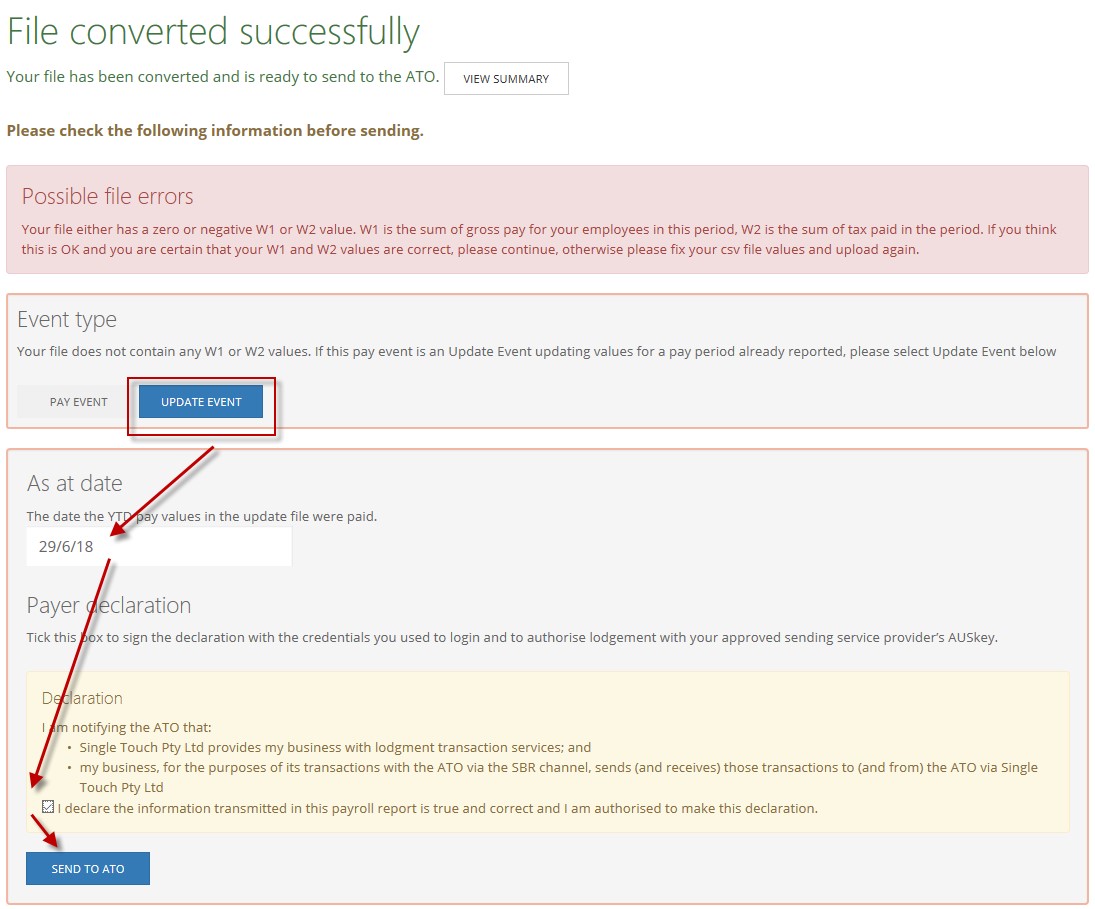
•The system will recognised there are no Period W1 and Period W2 values in the file and report a possible error.
•Choose the UPDATE EVENT button.
•Enter the payroll payment date in the As At Date box.
•Place a tick in the Declaration.
Choose the SEND TO ATO button. The file will be lodged and you will receive confirmation.

Next Single Touch Payroll Topic:
Single Touch Payroll > Links and Contacts
See Also:
Polygon Payroll > Using Single Touch Payroll
Polygon Payroll > Getting Started with Single Touch Payroll
Polygon Payroll > Single Touch Payroll > Summary
Polygon Payroll > Getting Started
Polygon Payroll > Using Polygon Payroll