For the purpose of reporting, a number of departments can be grouped together into Department Groups. This enables the Profit & Loss report to calculate combined figures for two or more departments. Any number of Department Groups can be added, modified and removed from the Department Groups File.
Please note: This functionality is only available if you have purchased a multi-department license.

From Polygon Back Office, Select Accounts from the main menu, then select Department Groups.
|
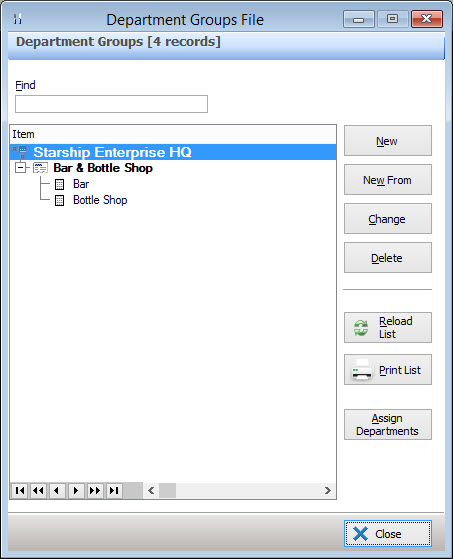
The following options are available from the Department Groups File:
•To create a department group - Click the New button, this will load the Department Group Details form where you can enter a name for the department;
•To add departments to a department group - Click the Assign Departments button, this will load the Departments File Pick List, highlight the departments which you wish to add to this group and click the Select button;
•To remove a department from a department group - Highlight the Department Group and click the Assign Departments button, this will load the Departments File. Hold the Control key on your keyboard and then click the departments which you want to remove this will un-highlight the items which you click on. Click the Select button to apply the change;
•To change a department group name - Highlight the department group and click the Change button. This will load the Department Group Details form where you can change the group name;
See Also:
Polygon Back Office > Department Accounts File
Getting Started with Polygon Back Office
Reports > Polygon Back Office > Profit & Loss