Production Categories are applicable only to Polygon POS.
This form is used to enter Production Category details when editing or creating a Production Category. Production Categories are a way of grouping PLUs together specifically for assigning what will print or display on which device for production.
Note: You are not asked to identify which Class the Category belongs to because Categories do not belong to Classes, PLUs do. In fact you could have a Category which contains some PLUs that belong to the Mains class and some PLUs that belong to the Entrees Class.

From Polygon POS Management, Select the Click the New button to create a new Keypad Category, or, Highlight an existing Production Category and click Change to edit this category.
|
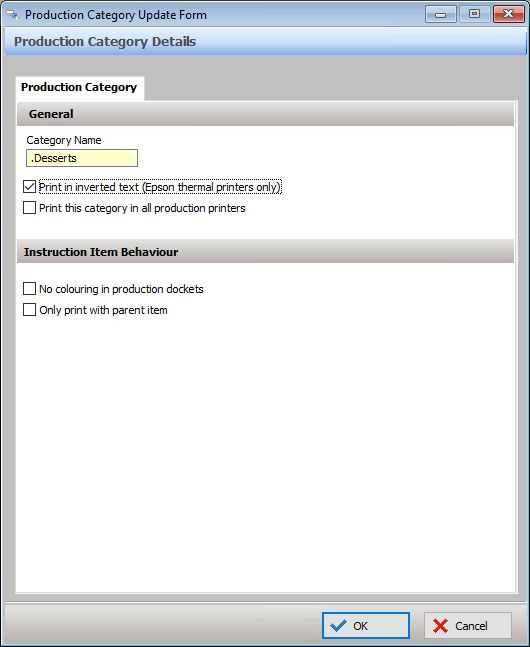
The options available on the screen are described below:
Completing Production Category Details:
General
•Name - Type a category name here;
•Print in inverted text (Epson thermal printers only)
This option will apply inverted formatting (white text on black background) for items in this category, when sent to an Epson thermal production printer.
•Print this category in all production printers
This option automatically assigns the category to print on ALL production printers programmed in the POS Network file. This means that there is no need to update the category printing in the POS terminal setup. However, most categories will be specific to an area, such as Kitchen or Coffee Station and should be assigned to the appropriate printer only. For multi-location users: Using this setting within a head office database, enforces the printing of this category on all production printers, including those at Franchise Owned locations.
Instruction Item Behaviour
•No colouring in production dockets
This setting is used if you do not wish to have instructions print out in red.
•Only print with parent item
This setting allows any instruction items in the category to be 'attached' to it's parent item and sent to the same production device as that parent item. The Production Category that contains these instruction items should not be assigned to the production device. Only the parent items need to be assigned.
If there is a production device that must always receive these instructions regardless of whether the parent item is assigned or not, then the category can be assigned as per normal and this will force the instruction to always print.
Please note that this behaviour is different to how the same setting worked in SmartPOS (legacy version of the POS application).
See this section for more information about Category Printing.