A production category groups a set of related PLUs, strictly for production output purposes. Production categories have no impact on how PLUs appear on the POS Terminal (refer to Keypad Categories).
Production categories apply ONLY TO POLYGON POS and the production category file, or production category fields will not be accessible in Polygon POS Management databases which have any locations utilising the Legacy POS application.

From Polygon POS Management, Select Products from the main menu and then select PLU Production Categories.
|
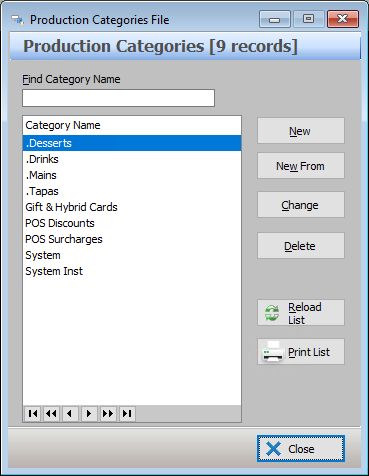
The following options are available from the Production Categories File:
•To create a new Production Category - Click on the New or New From button to access the Production Category Details form;
•To edit an existing Production Category - Click on the Change button to access the Production Category Details form;
•To delete an existing Productin Category - Highlight the Production Category and then click on the Delete button; a production category cannot be deleted while ever it is assigned to one or more PLUs.
•Reload List - This button is used in multi-user installations where multiple users may be entering data at the same time. Clicking this button will refresh the displayed data and show any changes made by other users;
•To Print - Clicking on the Print button generates a PDF report which shows the currently listed Production Categories. This report can be saved, printed or converted to CSV format.
See Also:
Getting Started with Polygon POS Management