The Opening Stocktake Report generates a report based on the stocktake data currently displayed on the Opening Stock Update Form.

From Polygon Back Office, Select Stock from the main menu, then select Stocktake to open Stocktakes File, Create a new Opening Stocktake, or open a saved opening Stocktake, This will load an Opening Stock Update Form, Enter your opening stocktake quantities, From the Stock Items tab, click the Print button and select Print Opening Stocktake Report.
|
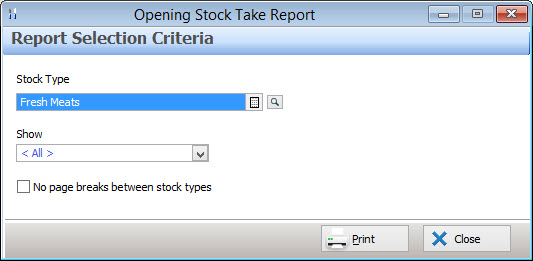
The report data can be filtered in the following ways:
•Stock Type - Click on the browse button  to select Stock Type(s) form a pick list;
•Show - Select to include Processed records (quantity has been entered), Un-Processed records (no quantity has been entered) or All;
•No page Break between Stock Types - Ticking this tick box saves paper by allowing different stock types to be included on the same page.
Click the Print button to view a PDF copy of this report. This report can be saved, printed or exported to CSV format which can be opened in spreadsheet programs.
See Also:
Polygon Inventory Introduction
Polygon Inventory > Getting Started with Polygon Inventory
Polygon Inventory > Using Polygon Inventory
Polygon Inventory > Stocktakes File
Getting Started with Polygon Back Office