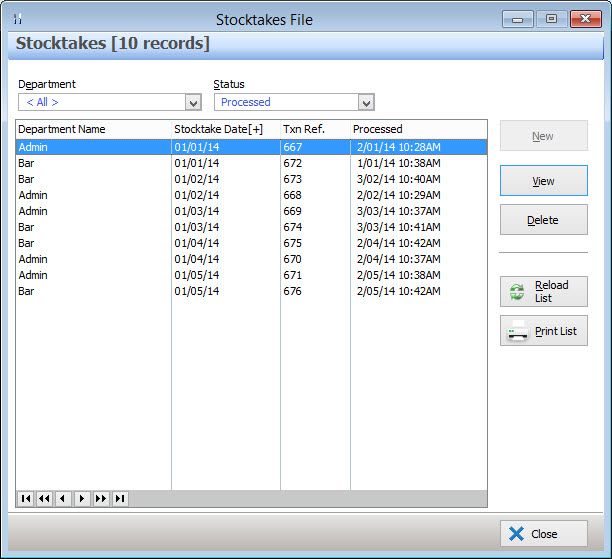
Polygon Inventory provides functionality which facilitates the recording of your stock levels and adjustment of costs and your stock records to agree with your stocktake count. The Stocktakes Form allows you to create, view, edit and delete opening and closing stocktakes. Previously entered Stocktakes are listed on this form. Stocktakes can be filtered by Department and Processed Status. The stocktakes list can be sorted by Stocktake Date, Transaction Reference and Processed Date.

From Polygon Back Office, Select Stock from the main menu, then select Stocktakes
|
Two types of Stocktakes can be entered, either Opening Stock or Closing Stock: Opening Stock You will need to set up your opening stock figures only once when you initially set up your system. This is not required if you are a new business with no opening stock quantities. If you are a new business and have no opening stock, the Polygon Inventory System Setting No Opening Stocktakes are Required should be ticked to indicate there is no requirement to process an opening stocktake. Otherwise this setting should be un-ticked. See the section Polygon Inventory Application Settings > Opening Stock for more information about Polygon Inventory System settings. If you have decided to enter an opening stocktake and have configured the Polygon Inventory Application Settings mentioned above. Load the Stocktakes File, select the appropriate department (if applicable), then click the New button and select Opening Stock from the pop up menu. Note: If an Opening Stocktake has already been entered, the Opening Stock option will not be available. Only one opening stocktake can be entered for each department. Click here for instructions explaining how to enter an Opening Stocktake.
Closing Stock Every time you record a physical stocktake you will need to enter the stocktake figures through this procedure in order to: •Observe any variance in perpetual stock values between the calculated and actual levels; •Calculate the change in value of each non-perpetual stock item since the last stocktake and adjust your stock usage expense/cost and your stock asset account accordingly. During this process Polygon Inventory rotates the figures so that the Closing Stocktake just entered becomes: •The Opening Stock Figure for Non Perpetual stock and, •The Initial value for calculations of Perpetual Stock for the next stocktake period.
To enter a Closing Stocktake. Load the Stocktakes File, select the appropriate department (if applicable), then click the New button and select Closing Stock from the pop up menu. Note: If there is an existing un-processed stocktake in the list, the New button won't be available. You will need to open the current un-processed stocktake by highlighting the entry and then clicking the Change button. Click here for instructions explaining how to enter a Closing Stocktake.
|
Stocktakes which have been entered but haven't been processed yet can be saved in the Stocktakes File and reopened later for editing. To edit a saved Stocktake: •Open the Stocktakes File; •Select the appropriate department; •Set the Status filter to Not Processed; •Highlight the Stocktake and click the Change button. This will load either the Opening Stocktake Details form or the Closing Stocktake Details form, depending on which type of Stocktake was selected.
|
Closing Stocktakes which have been processed can be viewed but they can't be edited. To view a processed Stocktake: •Open the Stocktakes File; •Select the appropriate department; •Set the Status filter to Processed; •Highlight the Stocktake and click the Change button. This will load the Opening Stocktake Details form or the Closing Stocktake Details form, depending on which type of Stocktake was selected.
|
Closing Stocktakes which have been processed can be Rolled Back or Deleted. This reverses all transactions against Stock Items and Cost/Asset accounts that came from the deleted stocktake. To Delete or Roll Back a Stocktake by following these steps: •Open the Stocktakes File; •Select the appropriate department; •Set the Status filter to Processed; •Highlight the Stocktake to Roll Back; •Click the Delete button, then click Yes to confirm the deletion.
|
See Also:
Polygon Inventory Introduction
Polygon Inventory > Getting Started with Polygon Inventory
Polygon Inventory > Using Polygon Inventory
Getting Started with Polygon Back Office