The POLYGON PAYROLL module reached end of life on 30 June 2021 and this was communicated to all clients licensed with this module.
This module is no longer supported.
Historical transactions may be accessed although entry of new payslips is no longer possible.
Single Touch Payroll Phase 2 has not been implemented.
If you are making a final payment for an employee, after the payroll is run and before the STP file is created you will need to:
•Access the Payment Summaries, review the details for the employee and make any additions or adjustments as required and mark the record as Processed and Locked. (See the section below on Payment Summaries).
•Update the Termination Date on the General Tab of the Employee record.
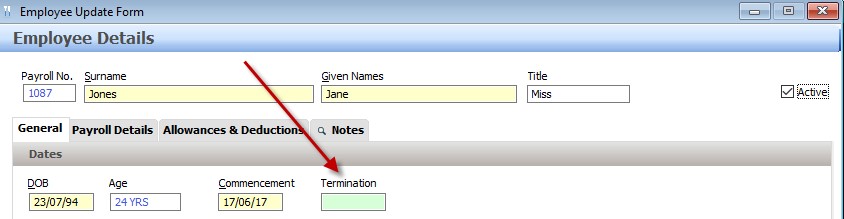
This will ensure that the details regarding the termination date will be included in the STP file, and will report the employee record as FINAL to the ATO. (This is now the equivalent of issuing the employee with a payment summary.)
Next Single Touch Payroll Topic:
Single Touch Payroll > Reporting a Fix to the ATO
See Also:
Polygon Payroll > Using Single Touch Payroll
Polygon Payroll > Getting Started with Single Touch Payroll
Polygon Payroll > Single Touch Payroll > Summary
Polygon Payroll > Getting Started
Polygon Payroll > Using Polygon Payroll