The POLYGON PAYROLL module reached end of life on 30 June 2021 and this was communicated to all clients licensed with this module.
This module is no longer supported.
Historical transactions may be accessed although entry of new payslips is no longer possible.
Single Touch Payroll Phase 2 has not been implemented.
If you have made changes to payroll data already reported to the ATO via your STP file, the updated YTD figures for the employee will be reported to the ATO in the STP file created for your next standard payroll run.
If however, you need to make adjustments to data in a previous financial year, you will need to create an Update file.
Update files
An update file will allow you to report changes to employee YTD amounts previously reported. It can only be used in circumstances where the employees are not paid. Usually this would only be for assisting with the EOFY process including finalisation of the year, and amendments to STP reported for prior finalised years.
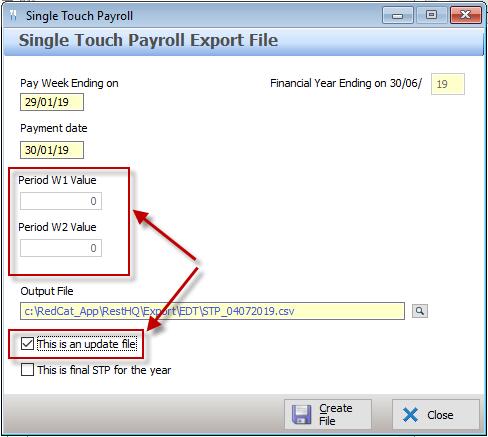
The Period W1 Value and Period W2 Value in an update file will always be 0.00.
To create an update file:
•Enter the Pay Week Ending and Payment Date relevant to the update (generally the last pay week ending and payment date of the financial year you are updating).
•If there are figures listed in the Period W1 Value and Period W2 Value boxes, change them to 0.00
•Ensure that the Output File location is set.
•Place a tick in the This is an update file box – the Period W1 and Period W2 entry boxes will be disabled.
•Choose the Create File button.
Next Single Touch Payroll Topic:
Single Touch Payroll > End of Financial Year
See Also:
Polygon Payroll > Using Single Touch Payroll
Polygon Payroll > Getting Started with Single Touch Payroll
Polygon Payroll > Single Touch Payroll > Summary
Polygon Payroll > Getting Started
Polygon Payroll > Using Polygon Payroll