The POLYGON PAYROLL module reached end of life on 30 June 2021 and this was communicated to all clients licensed with this module.
This module is no longer supported.
Historical transactions may be accessed although entry of new payslips is no longer possible.
Single Touch Payroll Phase 2 has not been implemented.
To successfully report payroll allowances that need to be itemised in the Single Touch Payroll (STP) file requires that each allowance be assigned the relevant ATO Allowance Category.
To do this:
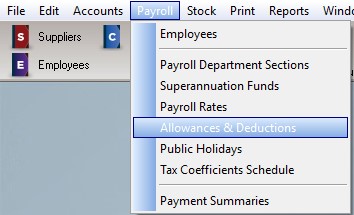
•Access the Payroll Allowances and Deductions File by choosing Payroll | Allowances and Deductions from the main menu.
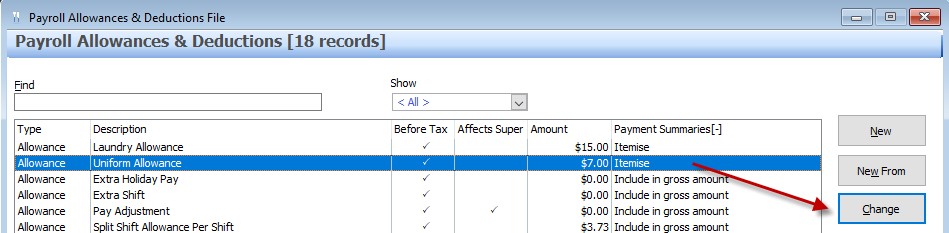
•Highlight each allowance that is listed to Itemise on Payment Summaries, and choose the CHANGE button.
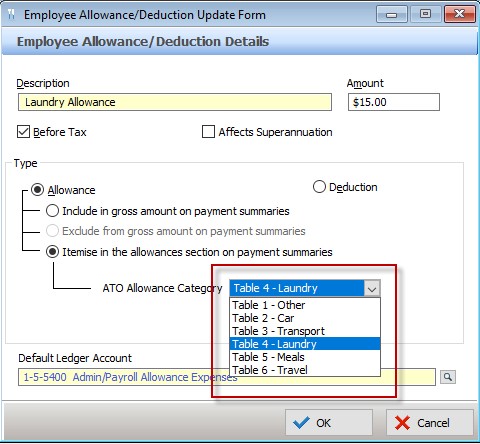
From the ATO Allowance Category drop down box, choose the relevant category. For more information on which allowances fall into each category, please visit the ATO page Withholding for Allowances.
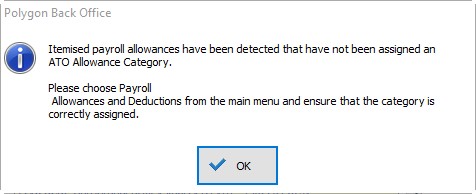
If payroll allowances are found in entries that are to be included in the STP export file, and these allowances have not yet been assigned an ATO Payroll Category the following message will be presented. You will need to visit the Allowances and Deductions File and ensure that an ATO Allowance Category has been assigned to each Itemised payroll allowance. See section Polygon Payroll > Allowances and Deductions File for more information about configuring allowances and deductions.
Next Single Touch Payroll Topic:
Single Touch Payroll > Check for Valid Employee TFNs
See Also:
Polygon Payroll > Using Single Touch Payroll
Polygon Payroll > Getting Started with Single Touch Payroll
Polygon Payroll > Single Touch Payroll > Summary
Polygon Payroll > Getting Started
Polygon Payroll > Using Polygon Payroll