The POLYGON PAYROLL module reached end of life on 30 June 2021 and this was communicated to all clients licensed with this module.
This module is no longer supported.
Historical transactions may be accessed although entry of new payslips is no longer possible.
The Payroll Allowances facility allows you to enter, change and delete standard allowances which may be paid to your employees and standard deductions which are taken from their wages. Allowances and deductions entered here will be available for quick insertion when processing your payroll. This is also where you will determine if an allowance is to be shown separately on the employee payment summary, added to the gross payment, or not included in payment summary calculations at all as per the ATO “PAYG Bulletin No 1 – Taxing of Allowances for the 2000/01 and future income years”. Users should check requirements for taxing of allowances and reporting of these allowances annually with the ATO.
Please note, a template for each allowance should be set up in this global allowances file and correctly tagged as to whether it should print separately on the payment summary. ‘On the fly’ allowances may still be entered in either the employee payroll record, or the employee timesheet while processing payroll, with different tax and super implications, and a different amount, but the system will check and match the name of the allowance with those in the global allowance file to apply the ‘show separately on payment summary’ status.

From Polygon Back Office, Select Payroll from the main menu, then select Allowances & Deductions
|
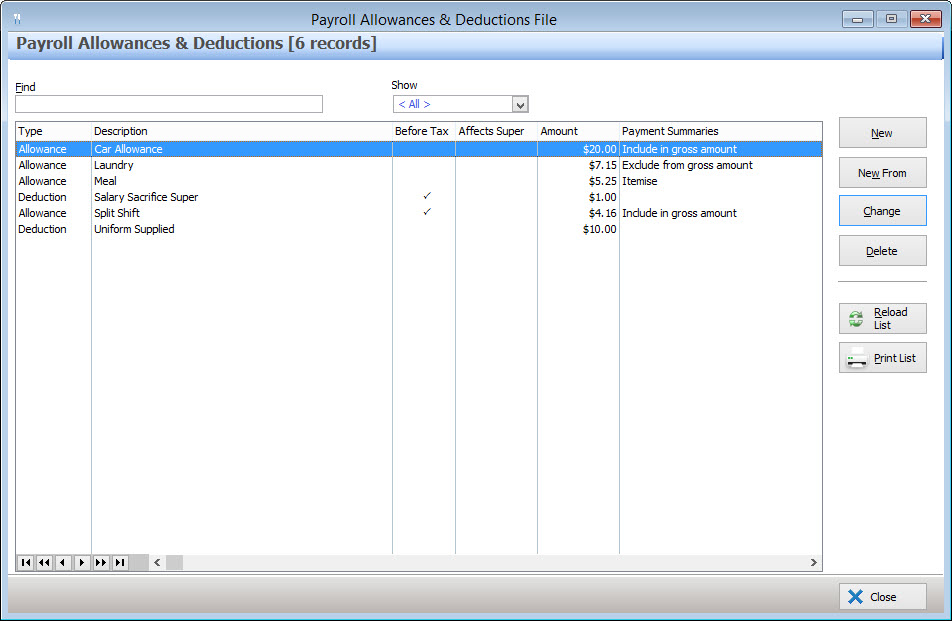
The Payroll Allowances & Deductions file lists Allowances & Deductions which can be assigned to an employee or employee payslip. This list displays the following information for each allowance or deduction. Click a column heading to sort the list by this attribute.
•Type - Indicates whether an item is an allowance or a deduction;
•Description - Additional information about the allowance or deduction;
•Before Tax - Ticked when an item is an allowance and it is taxable, or when the item is a deduction which is to be removed before tax is calculated.
•Affects Super - Ticked when an allowance or deduction and will be included in the superannuation calculations.
•Amount - The dollar amount of this allowance or deduction.
•Payment Summaries - Rules for how an allowance is included in payment summaries. The following options are available:
oInclude in gross amount on payment summaries - This indicates an allowance will be added to the Gross Salary figure on the employee's payment summary.
oExclude from gross amount on payment summaries - This indicates an allowance will not be included on the payment summary at all.
oItemise in allowances section on payment summaries - This indicates an allowance will be included in an itemised list on an employee's payment summary. This allowance amount will not be added to the Gross Salary figure on the employee's payment summary.
The following options are available from the Allowances & Deductions file:
•To add a new Allowance or Deduction - Click on the New button. This will load the Employee Allowance/Deduction Details form where you can enter the details of the new Allowance/Deduction;
•To edit an existing Allowance or Deduction - Highlight the Allowance/Deduction and click on the Change button. This will load the Employee Allowance/Deduction Details form where you can enter the details of this Allowance/Deduction;
•Filtering - The Payroll Allowances & Deductions file can be filtered so that only Allowances, only Deductions or both Allowances and Deductions are listed. To do this select Allowances, Deductions or All from the Show drop down list at the top of the form. Select All to view both Allowances and Deductions.
•Reload List - This button is used in multi-user installations where multiple users may be entering data at the same time. Clicking this button will refresh the displayed data and show any changes made by other users;
•Print - This button generates a printable PDF report which shows the Allowance/Deduction details as listed in the Payroll Allowances & Deductions file. This report can be saved, printed or converted into a CSV format;
•Find - To search for a particular Allowance or Deduction, type part of, or all of the item's name into the Find box. The system will highlight the first listed item to contain this text in its name.
Recurring allowances and/or deductions can assigned to an employee from the Employee Details form from the allowances & deductions tab.
Adjustments to recurring allowances/deductions, or once off allowances/deductions can be made when recording an employee payment, from the Employee Payslip Details form on the allowances & deductions tab.
See Also:
Polygon Back Office > Polygon Payroll > Payment Summaries
Polygon Back Office > Employees File
Getting Started with Polygon Payroll