Please note: This feature is only available if you have purchased a multi-department license.
The Stock Transfer Update Form allows you to record the specific details of a stock transfer from one department to another.

From Polygon Back Office, Access the Stock Transfers File by selecting Stock from the main menu, then selecting Stock Transfers, Click the New button to create a new Stock Transfer, or, Highlight an existing Stock Transfer and click the New From button to create a new Stock Transfer based on the currently highlighted Stock Transfer, or, Highlight an existing Stock Transfer and click the Change button to view or modify this Stock Transfer. |
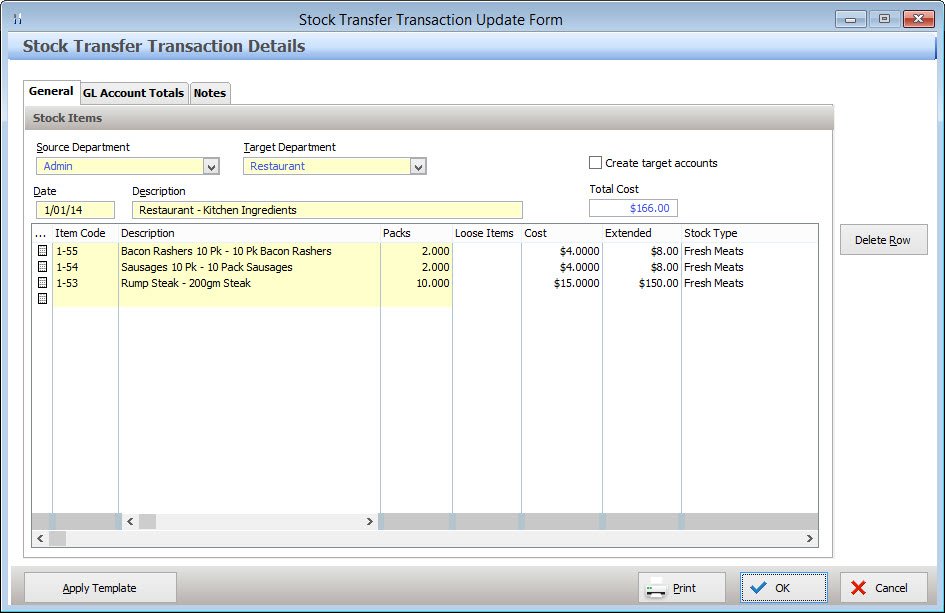
The Stock Transfer Update Form has three tabs where information can be entered. These tabs are described below:
The General tab provides access to the following information: Source Department - Select the department which stock will be transferred from; Target Department - Select the department which stock will be transferred to; Create Target Accounts - When transferring Stock to a department, the corresponding ledger accounts for each stock item need to exist in that Department. When the ‘Create Target Accounts’ tick box is ticked, the relevant accounts from Admin department will automatically export to the target department; Folio - This number is automatically generated by the Stock System; Date - The date of the Stock Transfer. Right click on this text box to use a date picker to enter the date, or press the "T" keyboard key to use today's date; Description - Enter a description to identify this stock transaction; Total Cost - The system automatically displays the value of the stock being transferred here. Stock To Transfer List: A list of stock items to transfer is shown at the bottom of the General tab. Stock Items and quantities can be added, changed & removed here. •To add a new item to transfer, click the line item button •To Change the stock type of an existing entry click the line item button •To Delete an item from the Stock Transfer list, select the row which you wish to remove, then click the Delete Row button.
|

The data in the GL Account Totals tab will be updated to show the debits and credits to the General Ledger Accounts that will be made when this stock transfer is completed.
|
The Notes tab is a free form field which allows you to enter additional information relevant to this stock transfer. Note: To easily see if notes have been entered for the stock transfer. Look for a magnifying glass icon shown on the notes tab.
|

When a stock transfer is frequently used, time can be saved by using a stock transfer template and then applying the template next time the stock transfer is needed. Once a Stock Transfer Templates has been created from the Stock Transfer Templates File, it can be applied and used to generate a stock transfer from the Stock Transfer Details form by clicking the Apply Template button at the bottom of the form. Clicking the Apply Template button displays the Stock Transfer Templates File which can be filtered by Source Department (where stock will be transferred from) and Target Department (where stock will be transferred to). Selecting All for both filters will display all Stock Transfer Templates. Highlight the template which you wish to use and then click the Select button. The details from the Transfer Template will be loaded into the Stock Transfer Details form where you can make any required changes to the stock transfer. Click OK to apply this Stock Transfer.
See section Polygon Inventory > Stock Transfer Templates for more information about creating Stock Transfer Templates.
|
Once all the required information has been entered, press the OK button to save and apply your stock transaction.
See Also:
Polygon Inventory > Getting Started with Polygon Inventory
Polygon Inventory > Using Polygon Inventory
Polygon Inventory > Stock Transfers File
Polygon Inventory > Stock Transfer Templates File
Polygon Back Office > Departments File
Polygon Back Office > Chart of Accounts
Getting Started with Polygon Back Office