Each PLU in Polygon POS Management has the option to record health instructions which can be printed on customer receipts. For example, you may want “97% Fat Free” or “3g Fat, 4.2g Carbohydrate” to print underneath the item. The PLU Health Instructions form allows you to manage which instructions are printed when a particular PLU is sold.
This feature can be turned on or off from the POS Location Settings > Printing - Receipt Dockets by ticking or un-ticking the Print PLU health instructions tick box.

From Polygon POS Management, Access the PLUs file by clicking the PLUs button on the toolbar, Then select the PLU which you would like to manage health instructions for and click the Change button, This will load the PLU Details form. Click the Health Instructions button to load the PLU Health Instructions form for this PLU.
|
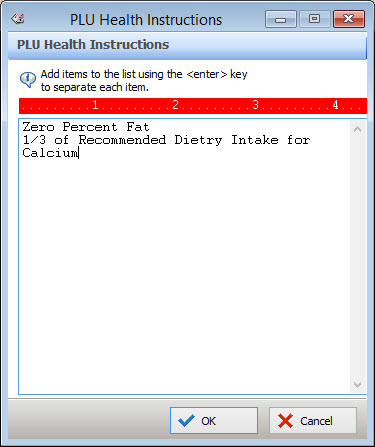
To add a health instruction, type instructions into the text are on this form. Each line can contain up to 20 characters, remember to press the Enter key on the keyboard to add a new line. Click the OK button to save changes.
See Also:
Polygon POS Management > PLU Details
Getting Started with Polygon POS Management