This section explains the quarantined updates feature which is available to multi-location databases acting as headquarters. This feature allows you to put a hold on any changes to the FOH while major changes are made at the BOH. Quarantining updates allows you to completely re-program the menu items and prices well before a new menu begins. While a location is quarantined, none of the changes can be sent to the FOH at the quarantined location. This ensures no location receives the menu changes until all the changes have been completed. On the day when the new menu is to be released, quarantine is turned off and the front of house can be updated via a standard POS Update.
Quarantine updates can also be helpful when making large changes over a few days. To avoid sending updates to the FOH before changes are completed, enable quarantine for all locations which will be affected by the planned changes. Once the changes are complete turn off quarantine updates and send an update.
Note: It is important to contact Redcat Support every time before using Quarantine Updates. Redcat support can be phoned on 1300 473 322 or emailed at support@redcat.com.au
Enabling Quarantined Updates Feature
In order to use Quarantined Updates, the feature must first be enabled from the Polygon POS Management Application Settings, from Add on Modules heading, and under the Remote Location Module sub heading. Click here to view the Polygon POS Management > Application Settings > Add on Modules section.
Quarantining a location
Each location in a BOH database can be quarantined/un-quarantined from the Location Details form. To quarantine a location go to the Data Access tab and tick the Quarantine update tick box. To release a location from quarantine un-tick this tick box. While the Quarantine Updates option is enabled, no new configuration changes will be available to the FOH. If you wish to quarantine a number of locations, open each location in the Location Details form and enable quarantine.
Web Menu Interfaces Tab
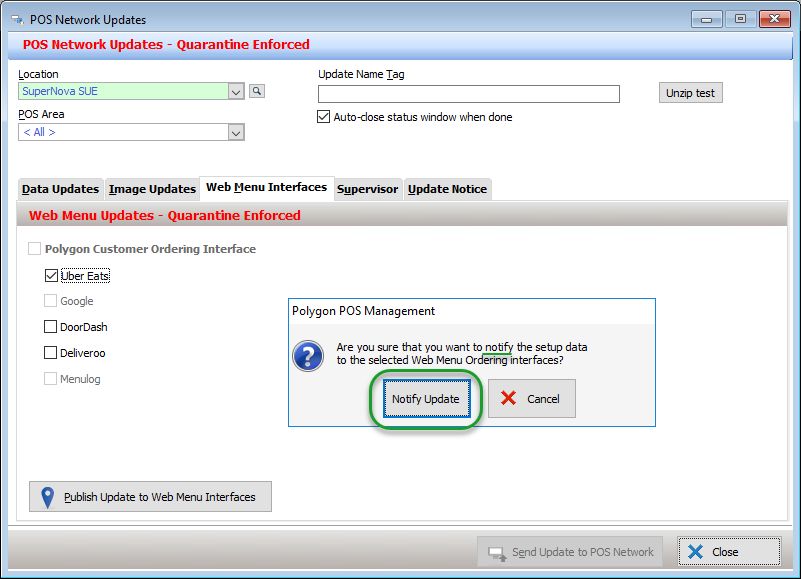
If Quarantined Updated are enabled (for one or more locations) 'publishing' the menu for Polygon Customer Ordering (and therefore third party web menu ordering providers) is not possible. This is to safeguard that changes to the menu are not released before intended.
You may still 'notify' a third party web menu ordering provider of a menu by placing a tick against the relevant provider and using the Publish Update to Web Menu Interfaces button. This will not update the Polygon Central tables with new data, it will simply reissue the current menu for that provider.
See Also:
Polygon POS Management > POS Updates
Application Settings > Add on Modules > Remote Location Module
Polygon POS Management > Location Details