The information in this document is divided into sections which describing the various features of Polygon POS Management and Polygon Back Office.
The topics in this document can be accessed using the Contents and Search options in the navigation panel at the left of the window.
|
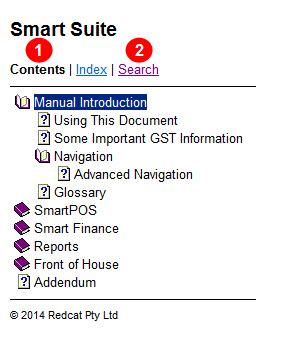
Help File Navigation Panel
Contents
To access the document contents click on the Contents 1 option at the top of the navigation panel.
The main document chapters will be shown.
The closed book icon  indicates a section contains sub sections. Double click on a closed book icon to expand a section and view the sub sections of this topic. The open book icon
  indicates this section has been expanded to display its sub sections.
Click on a topic's heading to view help on this topic.
Search
To search for information about a specific topic click on the Search option at the top of the navigation panel 2, enter a your search text and then click the List Topics or Submit button.
The search results will be shown in the navigation panel on the left. Click a topic heading to view information on this topic.
Expanding Text
In the main document, bold text marked with an arrow like this,  Example, indicates further information that can be viewed by clicking on the bold text. Clicking on the bold text again will hide the information.
Links to other topics
Throughout this text you will also see Links which are shown as underlined blue text. Clicking on a link will take you to another page with related information. To go back to the original page click the Back button at the top of the window.
How to Access Instructions
Most pages include a " How to Access" section towards the top of the page. Click this heading to view instructions explaining how to access the documented feature.
The See Also Section
A See Also: section with a list of related topics is shown at the end of a each page. Click a link to view documentation on this topic.
Context Sensitive Help
Pressing the F1 key on your keyboard will load this help file and display information relevant to the currently active window.
See Also:
Some Important GST Information
Polygon POS Management Introduction
Polygon Back Office Introduction