This section documents features used to operate the Polygon POS Management and Polygon Back Office programs. This information will help you operate the system quickly and efficiently. It is highly recommended that you review this section before using your Redcat back of house software.
Some more advanced navigation techniques are covered in the Advanced Navigation section of this document.

The tool bar contains a number of icons which are short cuts for the more commonly used menu commands. When you move the cursor or arrow across these buttons, you will see a small ‘balloon help’ pop up with a description of the function of the button. To use any of these, click on the relevant button.
The Polygon POS Management and Polygon Back Office Back of House toolbars are shown below. It provides quick access to commonly used functions. Click on a button below to display more information about this function.
Polygon POS Management Toolbar
Polygon Back Office Toolbar
|


Within the majority of forms in the Polygon POS Management and Polygon Back Office systems the following action buttons are likely to be found:
|
 This will create a new record.
 This will create a new record that is based on the selected (existing) record.
 This opens the window to edit the selected record.
 This will permanently delete the selected record
 This will generate a report which shows the data currently displayed on the form. This report can be saved, printed or converted to CSV format which can be loaded into many spreadsheet programs.
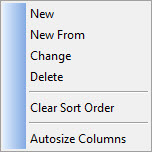
Most windows include a pop-up menu which can be accessed by clicking the right mouse button, The pop-up menus provide quick access to commonly used functions.
•New - This will create a new record
•New From - This will create a new record that is based on the characteristics of the selected record
•Change - This opens the window to edit the selected record
•Delete - This will delete the selected record
•Clear Sort Order - This will remove any advanced sorting that has been applied to the data
•Auto Size Columns - This will modify column width to fit the contents of each column.
|
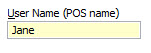
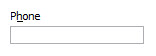
When configuring the system or entering criteria for reports, some data will be for information purposes only and other data will be changeable and either optional or required. To help you identify how data is used, BOH text is colour coded. Below is an explanation of each colour code.
Required Information - Yellow Background Text which is highlighted with a yellow background indicates this is a required field. Information must be entered here in order to complete your current task.
Optional Information - Black Text with White Background Optional data is shown with a white background and black text. You are not required to enter this data to complete your current task.
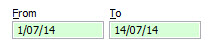
Context Menus - Green Background Text which is highlighted with a green background indicates that popup menus are available. Right clicking on a green part of the form will display a menu with special options for that item.
Read Only Settings - Blue Text Text shown in blue is read only. This means the text can't be edited but its settings can be changed or reassigned if: •A tick box •A Line Item button •A downwards arrow on a setting indicates a list of available settings - click the arrow to see which settings are available.
Unavailable Items - Gray Text Text in grey indicates that a setting can't be edited at all regardless of whether other buttons are available.
|




|
Many forms throughout Polygon POS Management and Polygon Back Office include the option to search for records. When you type text into a Find text box, the system will highlight the first item to begin with the search text. If no items begin with the search text, the first item to contain the search text will be highlighted. The Find feature is not case sensitive. That means if it doesn't matter if you type capital or lower case letters into the find box.
For example: Consider the example of searching for a PLU called 'Sweets'.
If you enter 'S' in the Find field, the first PLU that contains a 'S' would be highlighted.
If you enter 'Sw' in the Find field, the first PLU that contains 'Sw' would be highlighted.
|
|
A number of forms in Polygon POS Management and Polygon Back Office allow you to filter data based on a date range by entering a date in a From text box and/or a To text box. These text boxes are shown with a green background which indicates a pop-up menu will be shown when clicked on with the right mouse button. The pop-up menu provides a list of commonly used date ranges for quick and easy entry. Selecting one of these options will enter the appropriate dates in the From and To text boxes.
Each of the available date filters are shown below: •Repeat Last Used - Selecting this item will fill the From date and To date with the date filter which was most recently used; •Last Week - Selecting this item will fill the From date and To date with a seven day period leading up to the current date; •Last Month - Selecting this item will fill the From date and To date with the month period leading up to the current date; •Last Year - Selecting this item will fill the From date and To date with the year period leading up to the current date; •MTD - Selecting this item will fill the From date and To date from the first day of the current month until the current date; •YTD - Selecting this item will fill the From date and To date from the first day of the current year until the current date; •FYTD - Selecting this item will fill the From date and To date from the first day of the current financial year until the current date; •Select Date - Selecting this item will display a graphical date picker which allows you to select a date using your mouse (see below); •Clear - Selecting this item will clear any dates currently shown in the To and From text boxes. Graphical Date Picker If chose the Select Date option a date picker will be shown. Use the arrows at the top of the window to change which month or year is shown. Clicking a single arrow
|
 moves by one week. Clicking a double arrow
  moves by one month. Clicking an arrow with a bar at the end
  moves by one year. Click on a date to enter it into the date text box.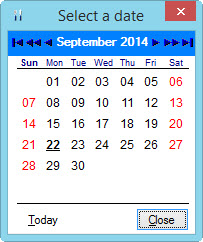
A list of available keyboard commands is shown in the table below.
|
|
Tree Lists contain groups of data in branches. Clicking a plus box
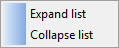
You can also quickly navigate tree structures using the right click function. Right click on the tree and a context menu will appear.
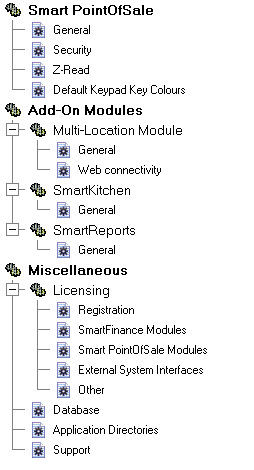
If you select Expand list from the menu, all items in the tree will expand as shown below.
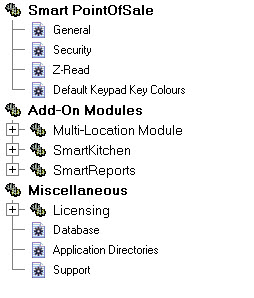
If you select Collapse list from the menu, all items in the tree will collapse as shown below.
|


At the bottom of a number of lists, you will see a VCR control panel. These buttons allow you to navigate the displayed list using the mouse. The role of each of the VCR buttons is explained below:
|

 Move to the first entry in the list
 Move one page up
 Move one item up
 Move one item down
 Move one page down
 Move to the last entry in the list
|

This button indicates that a list is available if you click on the button. This list, known as a pull down menu, displays the options from which a selection may be made.
|
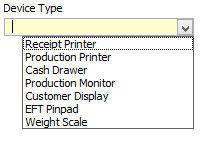
Where an entry is required and there is a list from which the required item may be selected you will see a Browse button •Press the Browse button to display the list. •Highlight the required item then press Select. Pick Lists can be a huge time saver. Some Pick Lists are built-in system lists indicated by the
|


To select an item in a list, position the cursor over the item and click the left mouse button once. Double clicking on the item will take you to the function most frequently used from the window which you are currently using.
|
Use the Tab key to move from one field to the next. In some transaction forms you can press the Enter key to move to the next field and press Ctrl+Enter to save the record.
|
Some windows in the system which display transactional information also have a column which shows the system transaction code. This code indicates in which area of the system the transaction was actually entered. Below is a list of these codes.
|
All windows within the system which display information lists may be resized vertically to ease your processing. This is achieved by clicking and dragging on either the upper or lower outer edge of the window. Windows which are used for data entry (forms) may not be resized.
|
See Also:
Polygon POS Management Introduction