This form is accessible from the POS Peripheral Details form. A cash drawer which is attached to a terminal can be configured to kick open when sales are paid for. Cash drawers can be connected via a serial printer, external devices called cash drawer kickers and some POS terminals have an inbuilt dedicated cash drawer port that the cash draw connects to directly.

From Polygon POS Management, Access POS Network File by clicking the POS Network button on the toolbar, Highlight the POS Terminal that you wish to add a peripheral to, then either: •Click the New button, then select Peripheral, then set the Device Type to Cash Drawer, or, •Highlight an existing Cash Drawer peripheral and click the Change button.
|
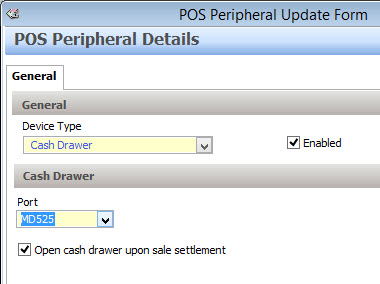
Device Type
This option is only changeable when creating new peripherals. Select Cash Drawer here.
Enabled
This setting will automatically be selected and should only be un-ticked if a peripheral is temporarily out of use.
Port
Select the port that the cash drawer is connected to. If a cash drawer is connected via a printer, the cash drawer port will be the same as the port selected when setting up the printer (eg. COM2). USB Cash Drawer kickers normally emulate a COM port. Determine which serial port is being emulated and select that port here. If the cash drawer is connected via a port on the motherboard of the unit, choose the applicable port, eg. ‘MD525’ – is used for a terminal P525 POS Terminals.
Open cash drawer upon sale settlement
Tick this setting if you want the cash drawer to automatically open after every sale is finalised.
Programming a Virtual Cash Drawer
Polygon POS recognises and will trigger cash drawers which are assigned to other POS terminals in the enterprise network. With the decline in cash payments the need to have a cash drawer for each POS terminal is not as great. Programming a virtual cash drawer allows for multiple tablets to be able to share one cash drawer in a central location.
To program a virtual drawer, choose the Network port and the system will present a list of all other cash drawers currently programmed. Choose the required drawer and use the Select button to save.
See Also:
Polygon POS Management > POS Peripheral Details
Polygon POS Management > POS Network File
Getting Started with Polygon POS Management