Production Displays are screens which show a list of orders which are waiting to be prepared. Production displays are configured from this form which is accessible from the POS Peripheral Details form by setting the Device Type to Production Monitor.

From Polygon POS Management, Access POS Network File by clicking the POS Network button on the toolbar, Highlight the POS Terminal that you wish to add a peripheral to, then either: •Click the New button, then select Peripheral, then set the Device Type to Production Monitor, or, •Highlight an existing Production Monitor peripheral and click the Change button.
|
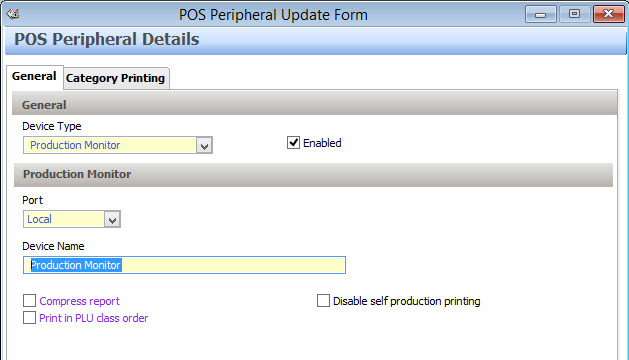
The Production Display Peripheral Details form is divided into two tabs General and Category Printing. These tabs are described below:
Device Type This option is only changeable when creating new peripherals. Select Production Display here.
Enabled This setting will automatically be selected. It should only be un-ticked if a peripheral is temporarily out of use.
Port •Local - Select Local if the Production Display is to be directly connected to this POS terminal. •Network - Select Network if you want to use a production display which belongs to another POS terminal. This will display all Production Displays which belong to other POS terminals at this location. Select the Production Display which you wish to use here. You can change the selected Production Display by clicking the Browse button To send orders to a production display which belongs to a different POS area, cross area printing should be enabled from Location System Settings > POS Terminal Settings > Cross Area Printing. See this section for instructions about enabling cross area printing.
Device Name This is the name that will identify this peripheral within the system.
Compress report This setting will automatically collate like PLUs on the production display. For example, if a sale contains more than one instance of the same PLU it will appear on the docket once showing the quantity of the items ordered e.g Three orders of Roast Lamb would be compressed to “3 x Roast Lamb”. If dockets are displayed uncompressed it will appear as “1 x Roast Lamb, 1 x Roast Lamb, 1 x Roast Lamb” on three separate lines.
Print in PLU Class order This setting will display items on the production display in PLU Class order (see section PLU Class Overview ). For example, ‘Entrees’ can be displayed ahead of ‘Mains’. If the function is not turned on, the production display will display items in the order that they were entered on the POS terminal.
Disable self-production printing If you select this option, orders will not be displayed for sales which are entered on the terminal to which this production display is attached. For example, you may have a Bar production display attached to a POS Terminal at the bar. You want sales entered at other terminals to display on the production display for the bar attendant, but do not want orders from the bar production docket to issue when the bar attendant enters a beverage sale using the bar POS Terminal.
|
 and then selecting a different production display.
Category printing refers to the assignment of categories to a particular peripheral. In other words, you determine which items will be displayed at which production display or production printer. If only one production display is being used, then there may be items that you may not want to appear on the monitor. On the other hand, if more than one production display is being used then you may wish to designate certain categories to each one. For example, if there is a production display in the kitchen and a production display at the coffee station then you might assign all the food categories to the ‘Kitchen’ production display and all the hot beverages to the ‘Coffee’ production display. See section Category Printing for more information about category printing.
|
Production Display statistics such as Sale Average Times can be accessed from the Polygon POS Management Service Productivity Report. See section Reports > Polygon POS Management > Production Display for more information about this report.
|
See Also:
Polygon POS Management > POS Peripheral Details
Polygon POS Management > POS Network File
Polygon POS Management > Category Printing
Polygon POS Management > Sharing Peripherals
Getting Started with Polygon POS Management