A category key is one which will display all PLUs for a selected keypad category. The desired PLU is then selected. For example, an Entrée category key might then display the PLUs Crumbed Mushrooms, Caesar Salad, Starter Platter etc. It is a convenient way to store and access less frequently ordered items and to condense keypads into a simple format. It may also be used to access sets of instructions that make up instructional categories, such as Kitchen Instructions, Coffee Mods, Add Flavour Shot, etc

From Polygon POS Management, Select the Product Keypads button from the toolbar, then either, •Click the New button to create a new product keypad, or, •Highlight an existing Product Keypad and click the Change button to modify the selected keypad, Then click on a blank button to add a new product keypad button, This will display the Keypad Button Details form, Click the Category button to select from a list of categories.
|
Consider the following case of different coffee variations and different coffee instructions: •There are 5 different coffee PLUs – Latte, Cappuccino, Flat White, Mocha and Short Black. They are all in the same keypad category – ‘Coffees’. •There are 5 different instructional PLUs – Hot, Weak, Strong, DeCaf and Soy. They are all in the same instructional keypad category – ‘Coffee Instructions’. •The ‘Coffees Instructions’ keypad category is linked to the ‘Coffee’ keypad category.
This means that when a selection is made in the ‘Coffees’ category, the ‘Coffee Instructions’ pop-up box will automatically be displayed next.
|
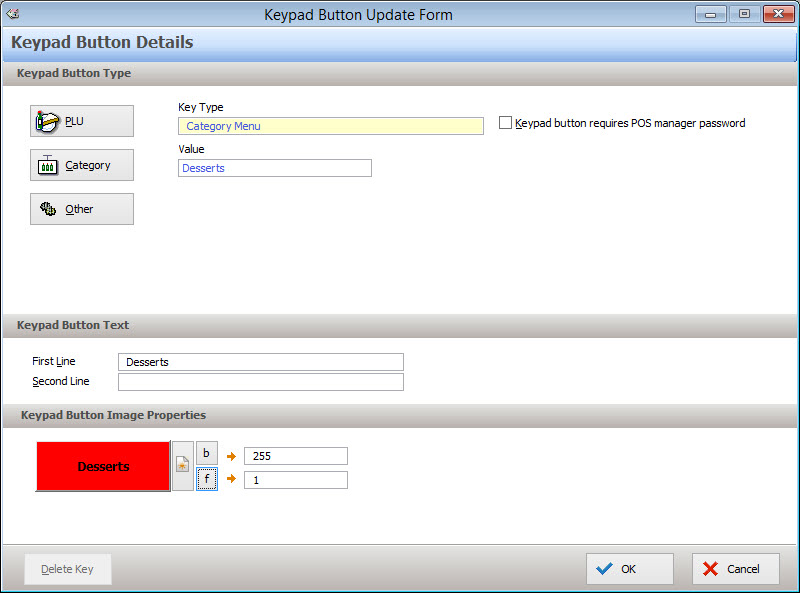
To Insert a Category Key:
•Select the Category button from the Keypad Button Type section.
•The Keypad Categories File will be displayed. Highlight the required Category and press Select.
•The Type and Value will automatically be inserted into the Keypad Button Update Form.
•The name of the category will be automatically assigned as the Keypad Button Text. However, you may change this as required (as in the screen above). Keypad button text can have a maximum of 10 characters per line.
•Modify colours and assign an image if required. For more information on assigning button colours and images, see section Keypad Button Details.
•Consider at this point which categories you would like to be linked. For example, if you link Tea to Tea Instructions, the Tea Instructions category will display immediately after ‘English Breakfast’ is selected from the Tea category.
•Press OK to save the key.
Keypad categories can be linked to other keypad categories to display chains of selections to POS staff when recording orders. For more information about linking keypad categories see section Understanding Category Linking.
PLUs can be assigned to a keypad category from the PLU Details form. See section PLU Details for more information about configuring PLUs.
See Also:
Polygon POS Management > Product Keypad Button Details
Polygon POS Management > Product Keypad - PLU Keys
Polygon POS Management > Product Keypad - Other Keys
Polygon POS Management > Understanding Category Linking
Polygon POS Management > Keypad Categories File
Polygon POS Management > Product Keypads File
Polygon POS Management > Keypads Overview
Getting Started with Polygon POS Management