Once you have identified that you are going to sell a particular item or use a particular item in the course of your business, you must decide whether it will be sold (or used) as part of a Category of similar items or as an item in its own right.
The secret to setting up the keys on the keypad is to understand how products are expected to be ordered and sold in your business and to set up the PLUs and Keypad Categories in the most efficient way to support that method.
This is perhaps the most important concept to understand. You MUST understand the way that Categories and PLUs can be linked to provide powerful functions if you are to get maximum benefits from your system and make your keypads effective and user friendly for your staff.
Consider the following example of selling spirits which use mixers, including ice. In most cases, spirits may be served with different combinations of mixers, including:
•no mixers/straight spirits;
•a soft drink (eg. coke);
•a soft drink and another mixer (eg. lime juice or bitters);
•any of the above, with or without ice.

The processes followed and the outcome is described below using the desired product ‘Jim Beam and Coke with No Ice’:
Firstly PLUs for different brands of spirits are created, with ‘Spirits’ as the Primary Category. For example, Jim Beam, Jack Daniels, Johnnie Walker etc.
PLUs for mixers and mixing instructions are created, with ‘Mixers’ (an instructional category) as the Primary Category. For example, No Ice, With Ice, Coke, Lemon etc.
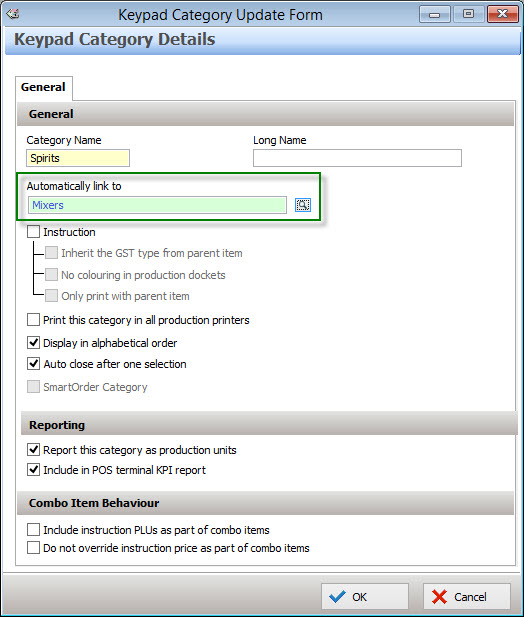
The Spirits category is automatically linked to the Mixers category as below:
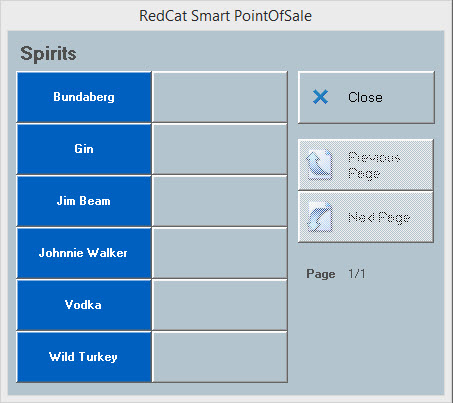
Secondly A keypad button for the ‘Spirits’ category is set up on the beverages product keypad. When pressed, a category pop-up of all Spirits in that category will display at the POS Terminal as follows:
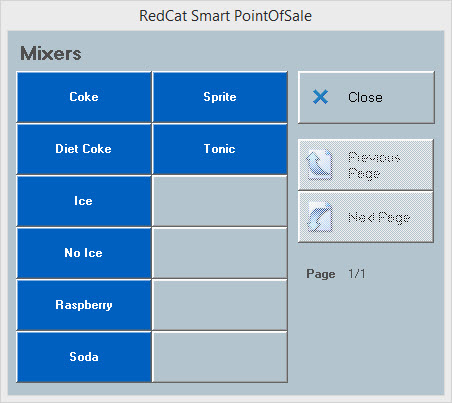
Thirdly When the user selects Jim Beam, a category pop-up of all items in the Mixers category will automatically display at the terminal as follows:
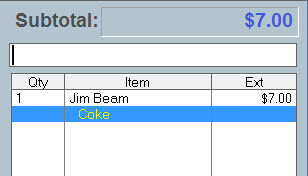
Note: The mixers category should be set up not to ‘Auto close after one selection’. This way, more than one instruction can be selected from the mixers list. The example item will appear in the sale window as follows:
Note: More than one link can be set up, to create a chain effect where appropriate. Also, one category may be used as a link to several relevant categories. For example, an instructional category of Condiments such as Honey, Butter, No Butter, Vegemite, Lightly Toasted, etc may be linked from the Toast Category and to the Sandwich Category as well.
|
For information about creating and configuring keypad categories please read these sections Keypad Category Overview and Keypad Category Details.
For information about assigning a category to a PLU to a category see section PLUs File section.
See Also:
Getting Started with Polygon POS Management