The Polygon POS Management Application Setting form allows you to choose how the Polygon POS Management BOH system will behave.

From Polygon POS Management, Use the keyboard shortcut by holding the Control button and pressing the A button, or, Select File from the Main Menu and then select Application Settings
|
Similar settings are grouped together and can be accessed by selecting a group from the tree menu at the left of the application settings form.
Note: For more information about navigating tree menus see section Navigating Tree Menus.
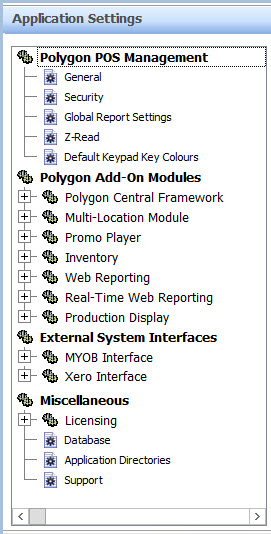
The Application Settings Tree Menu
The Application Settings are divided into the three main sections listed below. To read more about a section, click one of the links below:
•Polygon POS Management - This section provides general configuration settings for the Polygon POS Management BOH Application including display related settings, email settings, BOH account/security settings, z-read settings, default product keypad colouring settings.
•Polygon Add-On Modules - This section provides configuration settings for any installed add-on modules.
•External System Interfaces - This section provides configuration settings for any licensed external interfaces.
•Miscellaneous - This section provides general information about this installation of Polygon POS Management.
Note: Settings which alter how the FOH system behaves are not accessible from these Application Settings. To read about configuring settings which affect how the FOH behaves, see section POS Location Settings.
Restore from factory default settings
If you wish to revert back to the original 'out of the box' factory system settings use this button, then click OK to save changes.

Note: This button only applies to the active window of settings.
See Also:
Getting Started with Polygon POS Management
Polygon POS Management > POS Location Settings
Getting Started with Polygon Back Office