This group of application settings effect how the Polygon POS Management Back of House (BOH) application behaves. The settings are grouped into 3 major groups General, Z-Read and Security. The Major Groups are accessible from the tree menu at the left of the Polygon POS Management Application Settings form. The major groups contain sub groups which are described below.
Note: For more information about navigating tree menus see Navigating Tree Menus.

From Polygon POS Management, Use the keyboard shortcut by holding the Control button and pressing the A button, or, Select File from the main menu and then select Application Settings Then select the relevant option from the menu at the left of the form.
|

|
Default GST Rate This is the GST % that will be applied to transactions. It should be set to 10% in Australia.
|
|
To enable the system to automatically attach a file to an email message and send it, some settings regarding your email MAPI or SMTP server must be set. The values for these setting can be found in your Outlook mail account settings or your email service provider instructions.
Email server type - Enabling MAPI will allow the BOH to send the email using your default email program. Enabling SMTP will allow the BOH to send emails by contacting your email server directly. Note: Emails sent using MAPI will not be stored in your sent items folder. Mail server address - Enter the address of your email server. Mail server port - Enter the port used by your email server. Sender e-mail address - Enter the address which will be shown in the From: field of your emails. Note: the Sender email address is specific to each BOH user account and should be configured as required across all user accounts that will email directly from the system. Authorised user account - (Used for email accounts which require authorisation) Authorised user password - (Used for email accounts which require authorisation)
|
Set Main Window Size to 1024x768 Use this option to reset the Polygon POS Management main window size to its default minimum resolution of 1024 by 768 pixels. This is done by clicking the Line Item button
Show Window Contents While Dragging window When this option is disabled only the window border is displayed when a moving a window. Using this option may improve performance when moving windows on a slower computer.
Enable Lazy Display Mode This is a compatibility option which should be enabled if you are experiencing display issues such as sluggishness or jittering when moving windows. This setting only effects the BOH software.
Restore Default Window Size Some BOH windows are resizable. If you become unhappy with your current window sizes or locations, you can restore to their default size and location by clicking the Line Item button Note: Using this function restarts the BOH software. Any unsaved changes will be lost when this function is used.
|

|
Enable desktop wallpaper Ticking this option enables a coloured background on the Polygon POS Management and Polygon Back Office main windows.
Disable splash screen graphics on remote sessions Disabling the splash screen graphic which is shown when opening Polygon POS Management and Polygon Back Office can improve performance on slower remote access sessions which run Polygon POS Management and/or Polygon Back Office. Tick this item to disable the splash screen image.
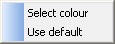
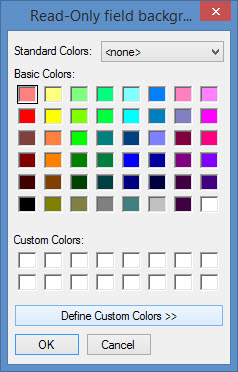
Setting Background Colours The Redcat BOH colour codes fields where you enter data. This is to communicate how the data should be entered. Redcat also allows you to customise how each type of field is colour coded. To set the background colour for a field type, click the Line Item button Selecting Use Default will restore the default background colour for the selected type of field. Selecting the Select Colour option will display the colour picker window (shown below). Click on your desired colour and then click OK.
Below is a description of each type of data entry field:
Entry field background colour An entry field is the standard form of input. It is not required and does not have popup menus
Read-Only field background colour Read only fields can't be edited by the user. They appear to display information only.
Required field background colour Required fields must have data entered before their form can be completed.
Popup menu availability background colour Fields with this background colour will display a popup menu with a selection of options when the field is clicked on with the right mouse button.
Header colour Sets the text colour of the heading at the top of each window.
Window background colour Sets the background colour of each window.
Highlight the last sorted column on browse windows Ticking this tick box helps identify the last sorted column by changing this column's background colour.
|
|
Auto-load transaction threshold - This setting determines how many historical records will be automatically displayed when a transaction window is opened. By default this setting is 30 days, which means when a transaction window is opened, records for the past 30 days will be listed. This value can be increased or decreased as needed. Changing this value to 0 days means no records will be automatically displayed, and changing this setting to a negative value e.g "-1 days" means all records will be displayed when transaction windows are opened. When there are a very large number of records, setting a negative value can result in transactional windows opening slowly as all records must be retrieved when the window is opened. Note: Any filters which are selected when the form is loaded will also be applied to the historical data.
|
Select a backup mode from the list at the items at the right of this option. There are several different ways to take a backup of your Polygon POS Management software. These are described below: •None - Not recommended. You will not be prompted to backup your BOH Data; •Daily Folder - This Backup Mode is a good starting point by saving a file daily to the PC hard drive. It protects against database corruption which could be caused by circumstances such as a power failure. However, it does not protect against hard disk failure or theft of the PC. •External device - This backup mode allows you to save to an external device such as a USB memory stick or external hard drive. It is more effective as the backup file is kept externally and not on the actual PC. •Daily Folder and External device - This backup mode offers the most protection and combines the two modes above.
See section Using Polygon POS Management > Database Backups for more information about backing up your database.
|
Postcodes Polygon POS Management includes a comprehensive list of Australian postcodes and their locations. Click the Line Item button
Polygon Paperless Kitchen allows for the prioritisation of orders which originate with web menu orders. This is useful if you need to ensure that orders which originate from a specific source take priority over other web orders. Click the Line Item button If Delivery = 1, Pickup = 2, Uber Eats = 1 and DoorDash = 2, then a delivery order from DoorDash will be prioritised before a pickup order from Uber Eats.
Highlight a listed WMO Provider and use the Change button to set the priority for that provider, where 1 is the highest priority. WMOs with a priority of 0 are excluded from the prioritisation rules.
To implement Paperless Kitchen Queue Prioritisation you may also need to: Enable Paperless Kitchen Queue Prioritisation |

|
Default Client Invoicing - POS Location This setting tells the system which POS Location will be shown on sales reports for sales which were recorded using a BOH client invoice. Click the Line Item button
Default Client Invoicing - POS User This setting tells the system which POS user will be reported for sales which were recorded using a BOH client invoice. Click the Line Item button
|
MIM Mode Enabled This setting is read-only and indicates if this database is licensed to use MIM (Menu Information Manager) within Polygon Central to manage and maintain the customer ordering menus. If enabled, for existing Customer Ordering PLUs the Customer Ordering Interface tab will be available, although all fields are displayed as read-only. It is available so that users can cross reference against pre-MIM programming if desired. For PLUs created after MIM is enabled, the Customer Ordering Interface tab will not be shown. In the POS Updates window, the Web Menu Interfaces tab is no longer available. This is because the menus are maintained and published by MIM from within Polygon Central. MIM Transition Mode This setting can only be enabled by a Redcat user and is used when there is an additional MIM centric Polygon Central database that will allow a longer time period to work up the MIM menus and perform UAT. |
|
Application User Security This section allows you to manage BOH user accounts and their permissions. Application user accounts - Click the select button Security Roles - Click the select button Note: Application User Security is also accessible from Polygon Back Office > System Settings in the Security section.
Enforce user privileges on "No Sale" button If this option is enabled, only users with the ‘Open Cash Drawer’ privilege enabled, will have access to the No Sale button at the FOH. Similarly, the privilege ‘Open Cash Drawer’ will only be available for change in the POS Staff file, if the above option is enabled.
|
|
Click the select button Detailed instructions for assigning images when accessing the Redcat Cloud platform can be found here. Report Style If you want the standard report header and footers included on your reports, ensure the Print report header and footer bars option is selected.
|
The Locale settings allow for customisation of tax and currency rules.
Tax Label - enter the label to be used for taxation purposes. eg. GST, VAT, TAX. Use Tax Exclusive customer receipt format - enable this setting if a customer receipt in tax exclusive format is required. Tax amount label - this string allows you to customise the taxation line on a tax exclusive receipt. Currency Sign - enter the relevant currency sign. eg. $, Rp, £. Decimal Places - indicate how many decimal places are required for the selected currency. Round to the nearest - enter the relevant rounding rules for the selected currency.
Locale settings which apply to Polygon POS, including assignment of currency label/value pairs and images may also need to be applied.
|
|
Load the most recent sales file automatically This option will instruct the system to automatically search for the most recent sales reset data which has been received from the FOH. It will then load this data for display when you enter the POS Revenue Processing Update form.
Overpaid management charges account Select the ledger account that will be adjusted if a POS sale is overpaid with a management account.
Consolidate discount names This option instructs the system to consolidate various discounts that may have been programmed when including them on Terminal Reset and other BOH reporting.
Post the actual media figures When resetting a master terminal, actual figures for media such as cash are entered and a variance is calculated (Variance = System Figure - Actual Figure) . If this option is enabled the ‘actual’ figures entered will be posted as the active figure at the time of processing instead of the system figure. The resulting variance in revenue will be automatically posted to the Cash Register Over/Under revenue account (see section Revenue Download for more information about posting POS revenue).
Enable cash drawer management (dual cash drawers) Cash Drawer Management is a facility which allows an individual staff member to be assigned to a cash drawer. No other staff member will be allowed to finalise sales, nor use the No-Sale key on that terminal. However, “Supervisor” level staff are given the privilege of ‘Cash Drawer Manager’ and may carry out these functions, but the fact that they did so will be logged in the Exceptions Report.
The Cash Drawer Manager is required to assign the staff member to the drawer. He/She may obtain Z-read reports for that specific drawer, and must finalise the drawer and log the staff member off. This facility also allows the connection of dual cash drawers to one terminal.
This is where to determine how you will handle processing credit card tips. There are two options: 1.Subtract from cash takings - This option assumes that the credit card tips are taken directly from the cash drawer and distributed or stored with the ‘cash’ tips. The system will then post the appropriate cash and credit card figures when committing the POS revenue. Note: For Legacy POS, if you are intending to record tips (cash and otherwise) against each individual staff member, and pay out each staff member using the Staff Tips report from the terminal, you need to select the first option. This restriction does not apply to Polygon POS users. 2.Accumulate as liability - This option will post the total of credit card tips to a liability account in Polygon Back Office called ‘Staff Tips Liability’ when the POS Revenue data is committed. You may then pay out the tips to the staff by cheque or cash and reduce the liability. With this option ‘cash’ tips are not recorded in the system. They are collected by some other means (eg. a ‘tip jar’).
POS Overs & Unders - GST Handling Choose the tax implication of amounts posted to the POS Overs & Unders ledger account from: •GST Inc •GST Free
Automatically map EFTPOS media to the 'EFT Media' Virtual Safe account If this setting is enabled, automated processing of resets will not be halted if a new Integrated EFTPOS media type is detected. Rather than have the user map the newly detected media manually to a Virtual Safe Merchant Card account, the system will automatically map to the system account 'EFT Media' and proceed with processing the reset. This setting is OFF by default for the Polygon POS Management database. It is ON be default for RTT processing services. |
This setting is used if you require the extended section of the Sales File Report to be included when automatically generating/printing this report after processing the sales reset at the BOH (see section Z-Read - Sales File Automatic Report Generation below).
Print revenue analysis section This setting is used if you require the revenue analysis section of the Sales File Report to be included when using automatically generating/printing this report after processing the sales reset at the BOH (see section Z-Read - Sales File Automatic Report Generation below).
|
Automatically generate metadata for PDF sales file report Enabling this setting will mean that the metadata required to generate a PDF file of the reset is saved each time a sales reset is processed.
Defer PDF file creation (for faster sales file processing) This setting is enabled by default, and means that the PDF files are not generated until the user clicks on the Show PDF Report button from within the Processed Sales Log. See section Polygon POS Management > Processed Sales Log for more information about accessing saved Sales File Reports (Z-Reports) .
Automatically print sales file reports Enabling this setting will mean that the Sales File Report (Z-Report) will automatically print after processing a sales reset.
|
These settings allow you to chose which colours will be used by default when adding buttons to the product keypad. Each key type can be assigned a background and foreground colour. When one of these key types are added to a product keypad these colours will be used by default. When a product keypad button is added, alternate colours can also be selected. Click the Line Icon button See section Product Keypads File for more information about product keypads and product keypad buttons.
|
Click the Line Item button
|
 to set the Content Directory for the Basic Promo Player. See section
See Also:
Application Settings (Polygon POS Management)
Getting Started with Polygon POS Management