PDE (Portable Data Entry) devices can be used during stocktakes to scan stock item bar codes and quickly record stock quantities. The stock quantities can then be quickly loaded into Polygon Back Office to automatically fill in Stocktake forms.
USING A PDE TO FACILITATE Stocktake
Polygon Back Office supports the use of the following PDE (portable data entry) devices:
•Denso BHT-6000, and
•Denso BHT-8000.
The Denso PDEs:
•Allow quick, easy and accurate stock taking via the scanning of the stock barcodes;
•Seamlessly integrate data from the PDE into the Polygon Back Office stock module.
The following instructions explain how to setup the PDE for use with the Polygon Back Office module.
Installing PDE Drivers Run the supplementary file called DensoDriverSetup.exe provided with your PDE unit. This file is required for users with Denso BHT-6000 and BHT-8000 PDE. Follow the on screen instructions from the setup program. You may need to restart the computer after installation.
Operating and Setting up the Denso PDE and Easy Pack Pro For detailed information on operating the Denso PDEs, please refer to the BHT-6000/BHT-8000 User Manual, which was installed along with the Denso PDE Drivers. For detailed information on how to use Easy Pack Pro, please refer to the Easy Pack Pro User Manual, which was installed along with the Denso PDE Drivers.
|
 | Enabling PDE Device Use in Polygon Inventory |
In order to use a PDE device for stock taking with Polygon Inventory the Enable PDE Device Interface setting must be enabled from the Polygon Inventory Application Settings > General System Settings. See section Polygon Inventory > Application Settings to read more about Polygon Inventory application settings.
Recording Stock Item Barcodes Each Stock Item in the Stock Items File can be associated with a number of barcodes. The list of Stock Items and barcodes is then sent to PDE devices before stocktaking. To assign a barcode to a stock item: 1.From Polygon Back Office, 2.Open the Stock Items File by clicking the Stock Items button on the toolbar, 3.Highlight a stock item which you wish to assign a barcode(s) to, then click the Change button to load the Stock Item Details Form; 4.Select the Stock Control tab, then click the Stock Item Barcodes button to open the Barcodes File; 5.Enter each barcode for this stock item and a description for each barcode; 6.Click the OK button on the Stock Item Barcodes File; 7.Then, click the OK button on the Stock Item Details form to save these changes. Repeat steps 3 to 7 for each Stock Item which you wish to assign a Barcode to.
|
Once barcodes have been assigned to their corresponding Stock Items, the Stock Items with Barcodes can be uploaded to PDE Devices. To do this: 1.From Polygon Back Office, 2.Open the Stock Items File by clicking the Stock Items button on the toolbar, 3.Click the Upload Stock Items to PDE Device button. This will load the PDE Interface Update form. 4.Connect the PDE Device to a serial port. Specify which port will be used from the PDE Com Port list box; 5.Set the Data Upload Type to Stock Data File; 6.Click the Upload File to PDE Device button to send the Stock Item Barcode list.
|
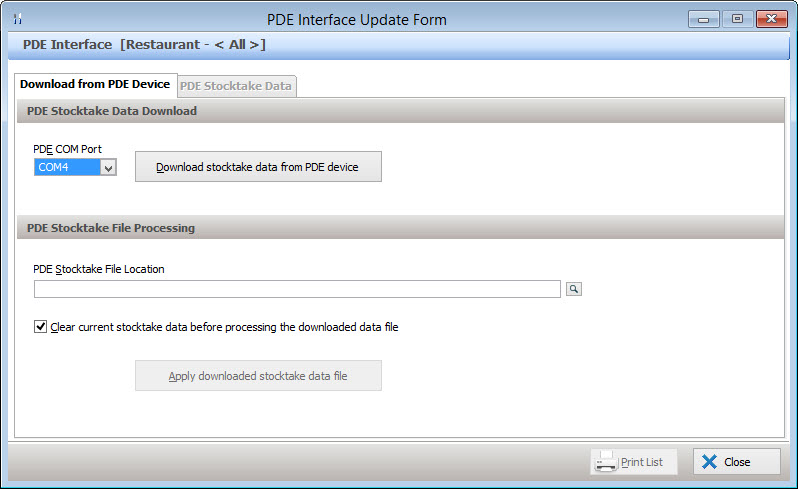
Accumulating Data for Processing from Multiple PDE devices Data loaded into the stocktake form from PDE files is accumulated by the system, that is, each set of data is read and entered into the form. If the item is already filled with unprocessed data the new data will be added to the field. Eg. If the data from the first PDE file contains a count of 5 for Carlton Cold, and a second data file is imported with a count of 6 Carlton Cold before the stocktake form containing the first data set is actually posted to the ledger the total number of Carlton Cold now displayed in the form will be 11. The information contained in each data file is accumulated. If you wish to load a data file from the PDE without accumulating the data, you will need to place a tick in the Clear current stocktake data before processing the downloaded data file tick box. This will remove all existing data from the form, then load in ONLY the new data.
Loading and Processing Data from PDE Devices Once stocktake is completed using the PDE, data can be downloaded into the Stocktake forms and processed as described in the above section on Polygon Inventory. The following procedure will guide you on how to download and process stock data from the PDE. If your stocktake count has been completed using a PDE device supplied by RedCat and you are now ready to import this data into your stocktake form, connect your PDE to the computer then: •Access the Stocktakes File •Choose the relevant Department from the drop down box (For multi-department licenses only). •Then select Closing Stock or Opening Stock (the opening stocktake option is only available when creating a department's first stocktake. See section Stocktakes File for more information about opening stocktakes). The Stocktake Form will be displayed.
•Enter the Stocktake Date. •Now choose the Download stocktake from PDE device button to bring up the PDE Control window. Only the Download from PDE Device tab will be available.
•Please decide if you wish to accumulate the data from this file in the stocktake form, or if you wish to load ONLY this file into the form. If you wish to load only this file place a tick in the Clear current stocktake data before processing the downloaded data file box. •At this point, you could either download a new stocktake data file from the PDE or open a stocktake file from your computer if you have previously downloaded it. To open a file from the computer, press the browse button •To download a new stocktake data file from the PDE, press the Download from PDE device button. •This will bring up a file save dialog where you can select the location you want to save your stocktake data file. By default, the save location is C:\RedCat_App\[Data Folder]\Interface\PDE\Inbox\. After saving, the following window will pop up, advising it is ready to start uploading from the PDE device.
•Whether or not you chose to download a new stocktake file from the PDE or selected a previously downloaded file from your computer, the following message will pop up asking whether you would like to process this file.
•Press No to simply save the file in the location you previously selected. •Press Yes to process the file. This automatically finds matching barcodes between the PDE file and your stock items, and will fill the detail in the stocktake form. If the file contains new barcodes that do not exist in the Stock Item file, the New Barcodes message will be displayed giving the option to print a report listing all the new barcodes found in the processed file. This report is handy for creating new stock items with barcodes.
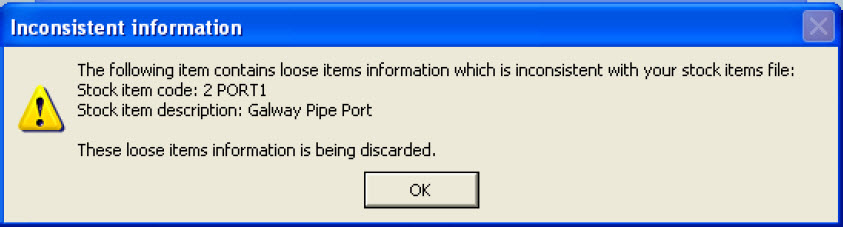
In some cases by accident, the user may have entered loose items count for an item which should never have loose items, e.g. any item that has Units per Pack of 1entered in the Stock Control tab of the stock item. This means that this item cannot store any loose items against it. If this occurs, an Inconsistent Information message will pop up advising the user that the loose items count imported for that particular stock item will be discarded.
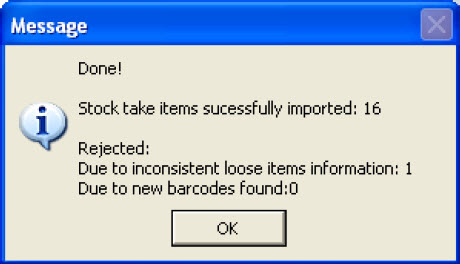
When the system has finished reading the import file from the PDE device, a message is displayed showing the status of the import.
When all data has been imported into the stocktake form, the stocktake may be processed as described in the Closing Stocktakes section.
|

 and select the file from the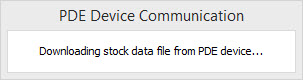


See Also:
Polygon Inventory Introduction
Polygon Inventory > Getting Started with Polygon Inventory
Polygon Inventory > Using Polygon Inventory
Polygon Inventory > Stock Items File
Polygon Inventory > Stocktakes File
Polygon Inventory > Stock Item Barcodes File
Getting Started with Polygon Back Office