The Users file records the names of the people you authorise to use your system and the permissions you assign to each person. The system is delivered with a default User Name of “1” and a Password of “1”. Change this to the details for the person who will have access to all aspects of the system. Each account is assigned a security role which determines which features this user can & can't use.
Note: Only users who have been granted the Manage Users application wide permission and the File > Application Settings main menu permission are able to access this form. See section User Security Roles Details for more information about configuring security roles.

From Polygon Back Office or from Polygon POS Management, Access Application Settings by either, pressing "Ctrl + A", or, selecting File from the main menu, then selecting Application Settings, Access the User Accounts File by selecting Security from the left of the window, then clicking the Line Item button
Then click the New button to Create a new User Account, or, Highlight an existing user account and click the Change button to modify the account.
|
 next to
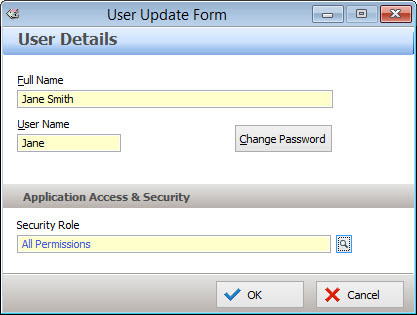
When adding or modifying a BOH User Account, enter the following information:
•Full Name - Enter the user's full name here;
•Username - Enter the name this user will use to log into Polygon POS Management and Polygon Back Office. The username must be 15 characters or less;
•Change Password - Click this button to assign or change the user's password. If you are creating a new user, entering a password is required. If you are changing the password of an existing user you will need to enter their current password in the current password field. Then enter the new password in the New Password field. Finally confirm the new password by re-entering it in the Confirmation field. Passwords must be 8 characters or less.
Select a Security Role
Security roles define how a BOH user can use the Polygon POS Management and Polygon Back Office software by enabling and disabling features for specific users. Each BOH user can have their own security role, or a group of BOH users can share the same role. To select a security role for this BOH user, click the browse button  and select the appropriate role from the Security Roles file.
Custom security roles can be added and modified from the Security Roles File, see section Security Roles File for more information about adding and editing security roles.
See Also:
Polygon POS Management Application Settings
Polygon Back Office Application Settings
Getting Started with Polygon POS Management
Getting Started with Polygon Back Office