The production server manages the jobs issued to the web-based Kitchen Display System (KDS) and replaces the ancillary Print Manager application at the POS. This form enables you to add a production server or edit production server settings, it is accessible from the POS Peripheral Details form.

From Polygon POS Management, Access POS Network File by clicking the POS Network button on the toolbar, Highlight the POS Terminal that you wish to add a peripheral to, then either: •Click the New button, then select Peripheral, then set the Device Type to Production Server, or, •Highlight an existing Production Server peripheral and click the Change button.
|
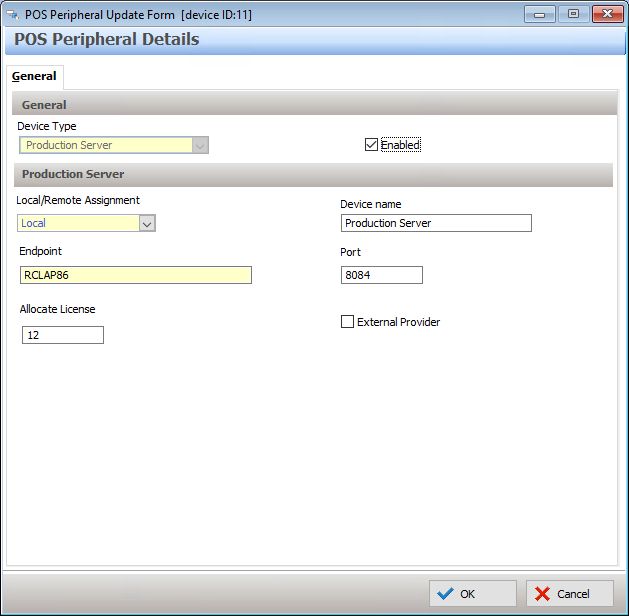
Device Type
This option is only changeable when creating new peripherals. Select Production Display here.
Enabled
This setting will automatically be selected and should only be removed if a peripheral is temporarily out of use.
Local/Remote Assignment
Indicates if the Production Server is attached to this POS Terminal (local) or another POS Terminal (network).
If a Network assignment is chosen, select the required Production Server from the list of all Production Servers available on the POS Network.
Generally, the single production server required for a POS Area is programmed on the master terminal, with slave terminals allocated a network assignment to this.
The exception is if a slave terminal has a local COM printer attached, in this case that terminal will also need a production server to handle the local printing.
Device Name
Enter a unique name to identify this Production Server.
Endpoint
Enter the IP address of the POS terminal.
Port
Enter the default port: 8084.
Allocate License
Enter the number of KDS instances that will need to communicate with this production server.
This field is only available when the Production Server Peripheral is on the Master terminal (it is not required for Production Servers on slave terminals handling local COM printing).
External Provider
If the production jobs are to be passed to an external provided, tick this box. The endpoint entered will then be relevant to the third party.
See Also:
Polygon POS Management > POS Peripheral Details
Polygon POS Management > POS Network File