Three log on modes are available for your POS terminals. If you require the system to track sales against specific staff members and enhance security features, you must ensure that either Multiple (Keypad Based) or Multiple (PIN Based) log on mode is configured for your terminal. This option is available for each terminal, and you may have separate terminals running different log on modes.
Staff members are required to ‘Log On” to the terminal at the start of their shift and ‘Log Off’ from the terminal at the end of their shift.
During the shift their ‘Staff Key’ or the PIN Log On screen will be displayed allowing them to quickly enter transactions while having all transactions logged against their name.
Logging On A Staff Member At Start Of Shift
When the terminal is opened, the Staff Log On Screen is displayed. In order to process a sale, the system requires a POS User to log-on.
The three staff logon modes are described below:

When using the Multiple Keypad based log on,each Staff member may log on to the systems as they arrived for their shift. To do this, they simply choose a blank button and press it. The Staff members who have previously been programmed in Polygon POS Management will be displayed. Those staff members already logged on will be shown along with the page number of the button they have used. See section Polygon POS Management > POS Staff Accounts for more information about adding new POS staff accounts.
To Log On: •If the staff member is not already displayed, click on a blank square to access the Staff File; •Highlight the appropriate staff member and press Select; •The key which was blank will now display the selected staff member's name; •Click on the Staff members name to log on and process a transaction;
Note: Once a Staff member is assigned to a button their name will remain there until they are logged off.
To Log Off a Staff member: •From the Staff Log On page; •Click on the Log Off button; •Click on the staff member who is to be logged off; •The square is now vacant and another Staff member can be assigned to this position.
There are keys available for 18 staff members on the screen displayed (page 1).Should more keys be required, a second page may be accessed by pressing the Next Page button located in the top right hand corner of the window.
|


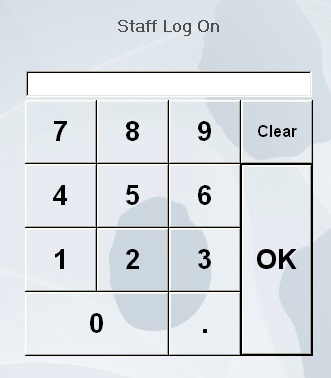
To Log On Each staff member needs to enter their password and then press OK to log on and process a sale. Note: This Log On mode offers the greatest security.
|
Cashier (single logon) requires that only one staff member be logged on when the software is opened. The system will assign every transaction to that staff member until the software is closed, then re-opened and another staff member is logged on. This system is designed for establishments where a ‘cashier’ is utilised that is, one staff member is responsible for finalising all sales and reconciling all takings.
|
The system will automatically ‘time out’ after the staff member finishes the transaction. (The ‘time out’ delay is set when programming the terminal file in Polygon POS Management. See section on Polygon POS Management > POS Terminal Details > Login Timeout for more information). As soon as the system ‘times out’, the Log On Screen will again be displayed ready for the next staff member and the next transaction. If another staff member needs to use the terminal immediately after your transaction and the system has not yet ‘timed out’ you may press the OK button to log yourself off and return to the log on screen. Note: This does not apply to Cashier (Single Logon) mode. To change a logon in this mode the till program must be closed & re-opened.
|
See Also:
See section POS Terminal Details for more information about changing POS Terminal Staff Logon Modes.
Getting Started with Polygon POS Management