POS Terminal/s run the RedCat Polygon POS Management application at the front of house to process sales. The POS Terminal Details form allows you to enter the configuration details for each POS Terminal.

From Polygon POS Management, Access POS Networks File, by clicking the POS Networks button on the toolbar,
Then Either: •To Create a new POS Terminal, oHighlight the POS Area which you wish to create the terminal for, oClick the New button, and then select POS Terminal option. Note: If there are no POS Locations or POS Areas, create a new POS Location and Area before creating the POS Terminal (see section POS Network File for more information about creating new locations and areas),
•To modify an existing POS terminal, oHighlight the existing POS Terminal
|
 and then click the

The POS Terminal Details form is grouped into two tabs, General and Network. These tabs are described below:
Terminal ID This number is automatically generated by the system.
POS Terminal Name Enter a terminal name here. This name identifies this particular terminal. (eg. your terminals may be named Front Desk, Bar, Waiter Station etc).
POS Area This indicates which POS Area this Terminal belongs to. To move the terminal to a different area, click the browse button
Department (Multi-Department Users Only) This indicates which department stock transactions and revenue will be recorded to. Note: This will default to Admin if you do not have multi-departmental Polygon Back Office. If you do have multi-departmental Polygon Back Office you may wish to assign POS Terminals to different departments. This will mean that revenue from PLU's sold at this POS Terminal will be assigned to revenue accounts from the selected department. See section Polygon Back Office > Department Accounts File for more information about Departments.
POS Area Section Assigning a Terminal to a POS Area Section determines how sales that are finalised on this terminal will be reported and how the media payment will be reconciled if using the POS Section Reset function at FOH. To assign the POS Terminal to a section, select the section name from the drop-down list of user-defined POS Area Sections. See Polygon POS Management > POS Area Sections for information about setting up sections.
This refers to the type of log-on mode that will be on the POS Terminal. Staff need to log on to the system each time a sale is to be processed and the logon modes are: •Multiple - Name Using this setting will enable any staff member to log on by simply selecting their name on the staff log on page. They will need to do this every time they wish to process a sale. •Multiple PIN This setting is similar to the above, however this time in order to log on, staff need to enter their password (PIN). This is the most secure method of log on but also requires the most keystrokes.
Logon Timeout This is where you set the amount of time (in seconds) the system will remain inactive for before reverting back to the staff logon page. This timeout will only apply if no sale items have been entered.
Default Sale Type If you want this terminal to automatically assign a sale type and issue any configured prompts when sales are entered, choose the required sale type from the drop-down list. This is useful when a POS terminal is predominately used for a specifc purpose. For example, a terminal dedicated to Drive Through orders, or the terminal at a takeaway coffee window. Note, the sale type can be changed if required prior to the sale being saved or finalised.
Enable Table Floorplan This enables at Floorplan keypad on this particular POS terminal. For Polygon POS you can choose to enable the Skip Table Floorplan after logon setting. This will not display the Floorplan between the logon page and the sale entry screen. The Floorplan can be accessed on demand using the Floorplan toolbar button at the POS.. See Also: Floorplan Keypads
Enable Delivery Module Ticking this tickbox enables the FOH customer management screen where customer details can be saved and recalled for Pick Up and Delivery sale types.
|
 and select a different area from the list of POS Areas.


Computer Name This is the internal name that identifies this particular terminal within the system and on the network. The POS Terminal must have windows configured so that the Windows computer name matches this text. The Windows computer name is accessible from Windows Control Panel > System > Computer Name Tab in the Windows POS Ready 2009 operating system.
Load as new instance on Multiple Display Mode This option should not be enabled unless you are running two POS terminals on the same computer, with different sets of data. This option should only be used under the advice of RedCat Support staff.
|
A dual screen peripheral is where one PC box is configured to run two separate instances of a POS Terminal. When using this configuration as POS Terminals it means that one PC can govern two touch screen monitors which act independently of each other and effectively provide the user with two POS Terminals in a cost effective manner. Or provide two different instances of a POS terminal which may behave differently during different trading periods. For example, this monitor may be used as a Restaurant waiter station during the day and as a Bar register after 9pm at night.
IMPORTANT NOTE: a POS Terminal which has been assigned as the Master terminal of this POS Area, may not be set to use Multiple Display Mode.
To instruct Polygon POS Management that the terminal you are creating will operate on a dual screen peripheral: •Program the POS terminal as detailed above in the section POS Terminal Details, POS Peripheral Details, and Category Printing. •Select the Network tab •Enter the Computer Name of the PC to which the dual screen peripheral is attached: This is the name computer name accessible from Windows Control Panel > System > Computer Name Tab in the Windows POS Ready 2009 operating system. •Place a tick mark in the Load as new instance on Multiple Display Mode box.
Understanding the POS Terminal Directory Structure The directory structure on a POS Terminal is as follows: C: \Redcat \Bin \T1 All program executable and associated files are resident in the \Bin directory and all working or data files are resident in the \T1 directory. When a POS Terminal is instructed to operate using a dual screen peripheral, it means that a new directory structure is needed so as not to interfere with the original terminal programmed to operate from the same PC. In this instance the directory structure created is: C: \Redcat \Bin \T1 \T1_14 where 14 is the POS Terminal ID number assigned by Polygon POS Management.
The original POS Terminal still has its working and data files in the \T1 directory, and the working files and data for the new POS Terminal which will operate on the dual screen or as a second instance are contained in the \T1_14 directory. NOTE: a second instance POS terminal may only be a 'slave' terminal within the POS Network tree.
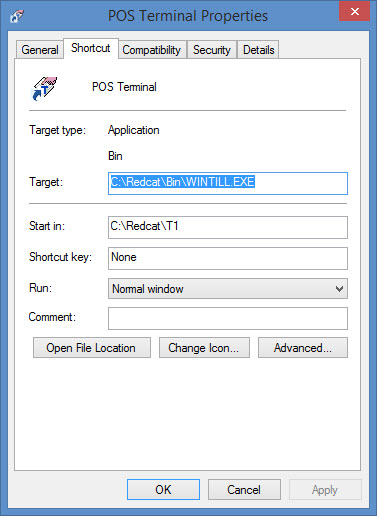
POS Terminal Desktop Shortcuts The shortcut created on the POS Terminal desktop to open the Polygon POS Management software has the properties Command Line “c:\redcat\bin\wintill.exe” while the Start In is “c:\redcat\t1.
When creating a shortcut for use on a dual screen peripheral, the Command Line will still be “c:\redcat\bin\wintill.exe, but the Start In will now be “c:\redcat\t1_14”
Opening POS Terminal on a Dual Screen Peripheral for the First Time Once the shortcut has been created for the POS Terminal which will operate on the dual screen peripheral, the system needs to be instructed where to display the resulting application. The first time that the shortcut is used to open the Polygon POS Management terminal software, the image will be displayed on the original monitor and not the dual screen. Using Window “Drag and Drop” technique, the application window can be moved to its final position on the dual screen monitor face.
|

See Also:
POS Terminal Redundancy and Recovery
Polygon POS Management > POS Network File
Polygon POS Management > POS Location Details
Polygon POS Management > POS Area Details
Polygon POS Management > POS Peripheral Details
Getting Started with Polygon POS Management