Terminals within each POS area follow an important hierarchy that becomes relevant in the event that the Master terminal of that area fails or becomes disconnected from the network. While the Master is always at the top of the hierarchy, the sort order of the slave terminals can be adjusted within the hardware tree. The second terminal in this list will act as a temporary master in the event the master terminal fails and the third terminal will take over if the master and the second terminal fail.
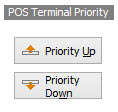
The terminal order can be adjusted in the POS Network File by highlighting a terminal and pressing either the ‘Priority Up’ or the ‘Priority Down’ button.
It is recommended that the Master terminal is the terminal you will use for the most trading hours in one day, as it will be the first terminal you log into upon opening, and it is the last terminal to log off at the end of trade.
Handy Hint: Once the order of priority for your terminals is decided upon and set up in the POS Network File, each machine should be physically labeled with a sticker showing the corresponding priority number. For example, Master #1, SlaveBar #2, SlaveWaiter #3, etc.
IMPORTANT: See section FOH > Troubleshooting for steps you must follow if your Master terminal goes down during trading times.
See Also:
Polygon POS Management > POS Network File
Polygon POS Management > POS Location Details
Polygon POS Management > POS Area Details
Polygon POS Management > POS Terminal Details
Getting Started with Polygon POS Management