If you have more than one POS terminal operating within a POS Area, it is important for senior staff members to understand the steps to follow when a master terminal fails. Different types of failure may bring your master terminal offline. Please refer to the table below for resolutions to these problems.
Problem |
Action Required |
Terminal locked – no response to keys being touched. |
If a keyboard is attached to the terminal: Press CTRL|ALT|DEL and open the Task Manager window. The terminal application will be shown in the Applications list as either RedCat Polygon POS Management, ‘Over The Counter’ or ‘Current Table: x’. Select this line and choose the End Task button. This will close the application. Now reboot the system in the correct manner (START|SHUT DOWN|RESTART THE COMPUTER). Open the Terminal application and continue normal operations. If the unit in question is the Master Terminal, follow the procedure detailed above but ensure that no other staff member uses any other terminal on the system until the Master is once again active. If it is the Master Terminal which has ceased operating, it is most likely that all other terminals on the system have also been affected. You should also re-boot these terminals. If there is NO keyboard attached to the terminal: Turn the terminal off, WAIT 10 SECONDS and then on again. The system will re-boot and commence startup. Because the unit has been turned off without the normal shut-down procedure, scandisk will run. The system will display a message ‘Windows was not properly shut down – one or more of your drives may have errors on it. Press any key to run ScanDisk on these drives…’. As the touch units do not have a keyboard just WAIT. After approximately 60 seconds the unit will automatically continue startup, log on to the network and proceed to the Windows Desktop. Open the Terminal application and continue. If the unit in question is the Master Terminal, follow the procedure detailed above but ensure that no other staff member uses any other terminal on the system until the Master is once again active. If it is the Master Terminal which has ceased operating, it is most likely that all other terminals on the system have also been affected. You should also re-boot these terminals.
|
Master Terminal Hardware has failed. For example: •Hard disk error or Windows corruption •Hardware or power failure
|
Please follow the master terminal recovery process detailed below. |

|
The Terminal Recovery Procedure is designed to get your POS terminal network operating again as quickly as possible. It is a temporary measure for continuing trade until time can be spent investigating the problem more closely. If your master terminal will be offline for a long period of time (eg. for repairs or to be replaced) you should follow the steps below for Assigning a New Master Terminal. If your master terminal fails, other terminals in the same POS area will be unable to run the RedCat program until they are restarted. The program will most likely freeze and need to be shut down manually.
When a terminal freezes there are two immediate possibilities: •If this is a slave terminal, an error has occurred either directly on this terminal or on the master terminal •If this is the master terminal, an error has occurred directly on this terminal
Check the status of the master terminal straight away: •If the master terminal is functioning correctly, restart this slave terminal. If it does not function correctly, shut it down. •If the master terminal is frozen, close RedCat on all other terminals first and shut them down, then restart the master terminal. If it still does not function correctly, shut it down.
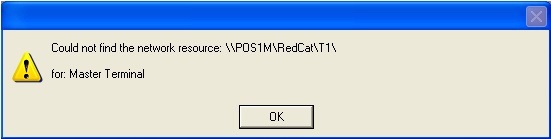
•Turn on the Back Up terminal; that is the #2 terminal in the POS Network hierarchy (see section POS Terminal Redundancy and Recovery). •Open RedCat on this terminal. When it cannot ‘find’ the Master terminal on the network the following message will be displayed:
•Click OK and the following message will be displayed:
•Press Yes and enter password
Now turn on other terminals on the network and log them into RedCat. They will recognise the temporary master as the new master terminal. The terminal which was #3 in the POS Hardware hierarchy will now become the Back Up terminal.
While the master terminal is offline, the above process will need to be followed each time the till software is opened on the temporary master. Therefore, if the problem on the master terminal cannot be rectified straight away, or it is sent away for repairs, consider assigning a new Master terminal within the back-of-house (see section POS Area Details). Note: The temporary master will inherit all of the hardware and system settings that are usually resident on the master terminal. For example, if a local (serial) printer is usually plugged into COM port 2 on the master terminal, it can be moved onto COM 2 of the temporary master to function the same way.
|

Once the master has been repaired you can re-assign a temporary master to a slave again and re-instate the permanent master by following these steps: 1.Before turning on the master terminal, re-attach any peripherals which were moved while the master was down. e.g. receipt printers; 2.Close Redcat on all terminals; 3.Turn on the repaired master terminal; 4.Start Redcat on the master terminal; 5.Start Redcat on the slave terminals.
If you have re-assigned a slave terminal as a permanent master, you can reassign the master terminal at the BOH by editing area settings in POS Locations (see section POS Area Details).
|
|
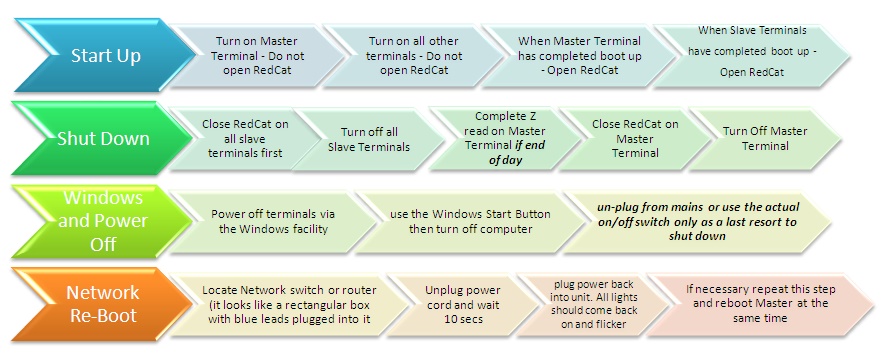
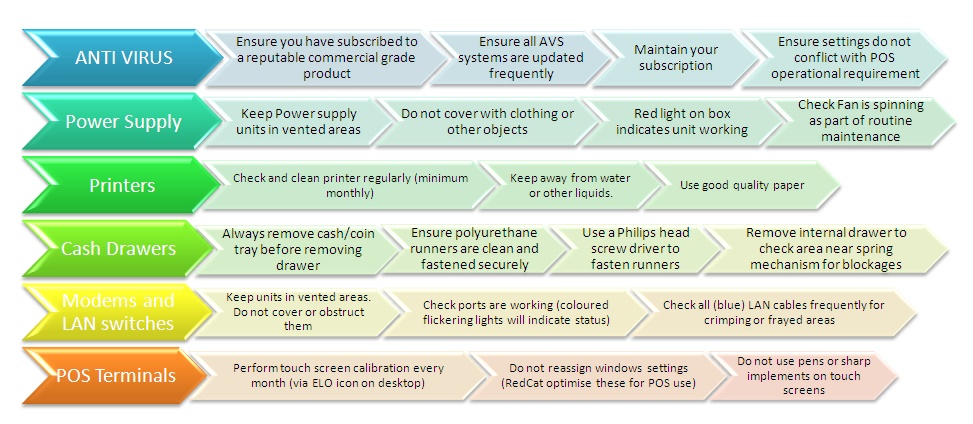
Other Notes: •Heat may affect your network. Cat5e (blue) data cables will deteriorate over time and changes in weather or temperature may intensify the effect. Loose or damaged points will cause instability across your network. •Plugging cables into wrong ports may cause failures to your router, network switch or POS terminal. Use caution when reattaching cables. •Your POS system terminals are computers, they will respond to viruses and misuse like all other computers. •When cleaning touch screens unsure the terminal is switched off. Rubbing wet cloths all over the screen when the unit is on may cause the terminal to freeze. Remember a touch screen is a virtual keyboard jamming all the keys at once will cause inconsistent responses. •WARNING - Shutting off power to your terminal using an incorrect procedure may cause Hard Drive corruption
|
See Also:
POS Terminal Redundancy and Recovery
Getting Started with Polygon POS Management
Getting Started with Polygon Back Office