This file allows you to view merchant card transactions for a selected merchant card.

From Polygon Back Office, Open the Merchant Cards File by selecting Accounts from the main menu then selecting Merchant Cards, Highlight the Merchant Card which you wish to view transactions for and then click the Transactions button.
|
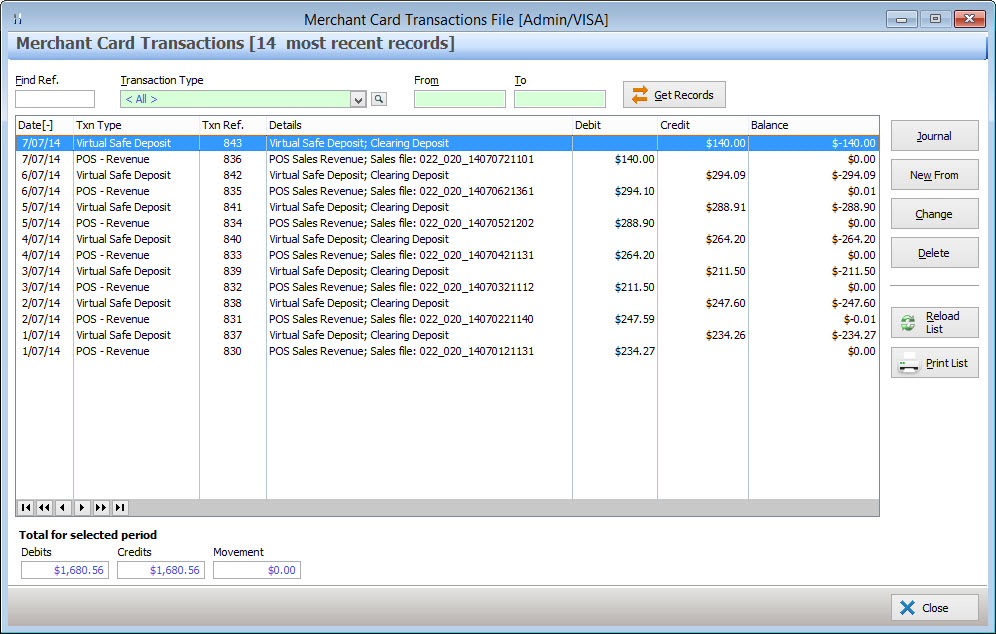
Most Recent Records When this form loads, the transaction list will automatically be populated with a page of the most recently recorded transactions. Older entries can be viewed by entering a date in the To and/or From text box (see below). The number of items which are automatically displayed can be increased or decreased by changing the Auto-Load Transaction Threshold setting in the Polygon POS Management application settings. See section Polygon POS Management Application Settings > Polygon POS Management > General - Transactional Browse Forms for more information about this setting.
Filtering by Date Entering a date in the From text box only will exclude records from before this date. Entering a date in the To text box only will to exclude records after this date. Entering both a From date and a To date will display records which are dated within this period. Leaving the From and To text boxes blank will display a page of the most recently added items (described above). The To and From date boxes also provide pop-up menus for quick access to commonly used date ranges. See section Navigation > Quick Entry of Commonly Used Dates for more information on this topic.
Filtering by Transaction Type Select a transaction type from the Transaction Type list box to filter the transaction list list by this transaction type, or click the browse button
Get Records Once you have entered your filtering options, click the Get Records button to apply the filters and display the requested data.
|
 from to select multiple transaction types. To reset the transaction type filter, right click on the list box and click
The Merchant Card Transactions File allows you to create, modify or delete merchant card transactions. These functions are accessed by clicking on the following buttons: •Journal - Clicking the Journal button loads the Journal Entry Transaction Details form. From this form journal entries can be recorded for this merchant card. •New From - If a new transaction has similar details to an existing transaction, highlight the existing transaction and click the New From button. This will open the relevant data entry form and fill it with the details from the existing transaction. This speeds up data entry because you will only need to change the data in the new transaction which differs from data in the existing transaction; •Change - To view or edit a merchant card transaction, highlight the transaction and click the Change button . For standard transactions, this will load the relevant data entry form where you can view/adjust the details for this transaction. If the selected transaction is a batch payment, the transaction will be shown in the Reference Viewer. To view which items were included in the batch payment, select the Invoice Batch Payments tab. For more information about the Reference Viewer, see section Reference Viewer; •Delete - To delete a transaction, highlight the transaction you wish to remove and click the Delete button. If you are sure you want to permanently remove the transaction, click Yes when prompted for confirmation.
|
When merchant card transactions are filtered with a From date, a Brought Forward entry is added. This shows the totals for all the transactions leading up to the entered From Date. That is, the Total Credit Amount, Total Debit Amount and the Balance for all entered data until immediately before the beginning of the search filter. The Brought Forward entry is identified as "Brought Forward" in the Details column. If the data is filtered ascending by date, the Brought Forward entry will be shown at the top of the list.
|
When a date filter is applied to the bank account transactions, the filtered data is totaled and displayed at the bottom of the form under the heading Total for Selected Period. The Debits figure shows the total for all debits listed. The Credits figure shows the total for all credits listed. Movement shows the total debits minus the total credits.
|
See Also:
Polygon Back Office > Merchant Cards File
Polygon Back Office > Accounts
Getting Started with Polygon Back Office