Sales Log by Sale ID - Table Tracking
The Sales Log File By Sale ID is a complete record of all sales processed through the POS terminals. It can be used to review specific details for a particular sale and can be printed for use as a tax invoice.

From Polygon POS Management, Select Sales from the main menu and then select Sales Log by Sale ID or, Select the Sales Log button from the Toolbar
|
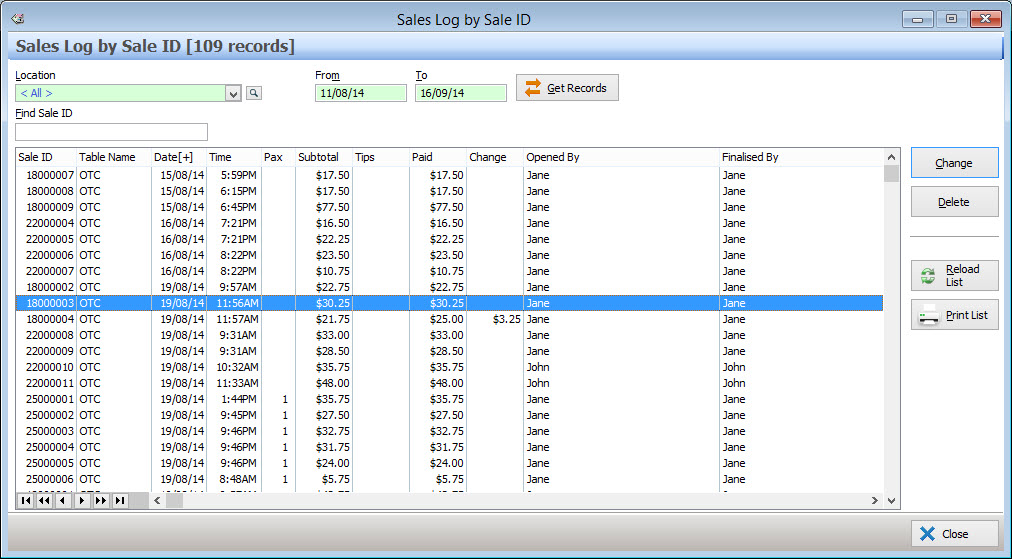
Most Recent Records When this form loads, the sales log list will automatically be populated with historical data. By default, records from the last 30 days will automatically be displayed. Older entries can be viewed by, entering a date in the To and/or From text box (see below). The number of items which are automatically displayed can be increased or decreased by changing the Auto-Load Transaction Threshold setting in the Polygon POS Management application settings. See section Polygon POS Management Application Settings > Polygon POS Management > General - Transactional Browse Forms for more information about changing the number of automatically displayed records.
Filtering by Location If you have a multi-location database you can filter the location sale log by location. To do this, click on the browse button
Filtering by Date Entering a date in the From text box only will exclude records from before this date. Entering a date in the To text box only will to exclude records after this date. Entering both a From date and a To date will display records which are dated within this period. Leaving the From and To text boxes blank will display a page of the most recently added items (described above). The To and From date boxes also provide pop-up menus for quick access to commonly used date ranges. See section Navigation > Quick Entry of Commonly Used Dates for more information on this topic.
Get Records Once you have entered your filtering options, click the Get Records button to apply the filters and display the requested data.
|
 then highlight the locations which you wish to view and click the
The following data is displayed in the Sale ID Sales form:
Sale ID - This is a unique identifier for each sale. The Sale ID number is comprised of ‘Terminal Number’ – ‘Receipt Number’;
Table Name - This is the table number to which the sale was assigned. OTC stands for ‘over the counter’ sale;
Date & Time - This is the date and time that the sale was finalised through the terminal;
Pax - This is the number of covers entered for the table;
Subtotal - This is the final amount of the sale;
Tips - This column show the amount of any tips given during payment for the sale;
Paid - This shows the total amount tendered by the client as payment for the sale;
Change - This column shows the amount of any change given to the client;
Opened By - This column displays the name of the staff member who opened this sale;
Finalised By - This column displays the name of the staff member who finalised this sale.
The following options are available from the Sale ID Sales File:
Viewing a Table Transaction - Any sale may be viewed in more detail simply by highlighting the table entry and choosing the Change button. This will display the POS Sale Details form;
To Search for a Particular Transaction - Type part of or all of the Sale ID into the find box.
Reload List - This button is useful if you have a multi-user license where more than one user can access Polygon Back Office at a time. Click this button to update the list with any changes made by other users such as newly processed sales resets;
To Print - Click on the Print List button to generate a report showing the currently displayed list of transactions. This report can be saved or printed or converted to CSV format which can be loaded into spreadsheet programs.
Housekeeping the Table Log File
The Table Log file should be periodically purged to maximise available space on the hard drive of your PC and to keep your system operating efficiently. For more details on purging this file, please see section Log Files Maintenance/Housekeeping.
See Also:
Polygon POS Management > POS Sale Details
Log Files Maintenance/Housekeeping
Getting Started with Polygon POS Management