Polygon Inventory allows you to record the physical transfer of stock from one department to another using the stock transfer feature. When a stock transfer is frequently used, time can be saved by adding a stock transfer template, this records the details of a frequently used transfer. The stock transfer template can then used to quickly fill in the details of a stock transfer when needed. This form allows entry of the specific details for a Stock Transfer Template.
Please note: This feature is only available if you have purchased a multi-department license.

From Polygon Back Office, Select Stock from the main menu, then select Stock Transfer Templates, Click the New button to create a new Stock Transfer Template, or, Highlight an existing Stock Transfer Template and click the New From button to create a new Stock Transfer Template based on the currently highlighted Stock Transfer Template, or, Highlight an existing Stock Transfer Template and click the Change button to view or modify this Stock Transfer Template. |
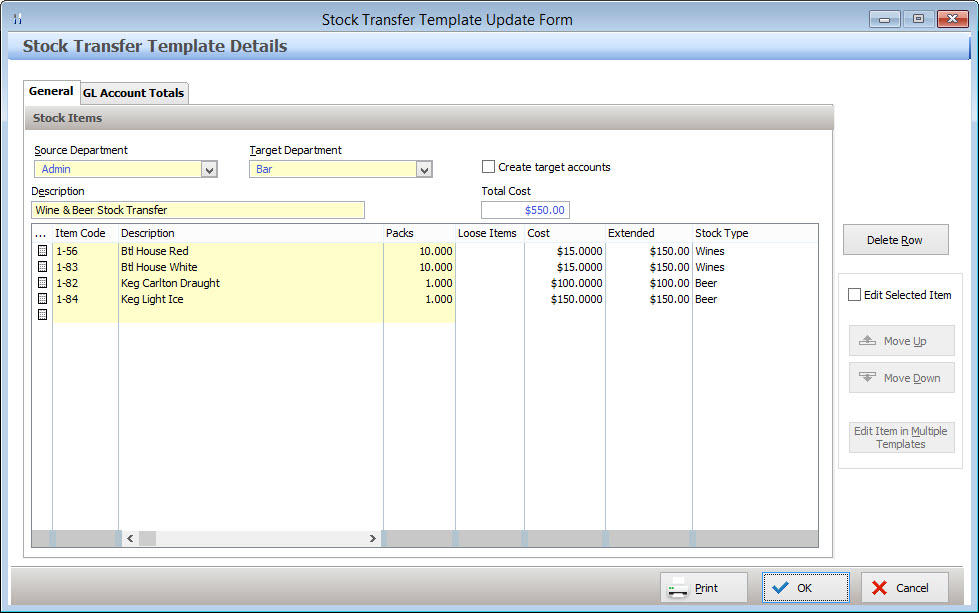
The Stock Transfer Template Details Form has two tabs where information can be entered. These tabs are described below:
The General tab provides access to the following information: Source Department - Select the department which stock will be transferred from; Target Department - Select the department which stock will be transferred to; Create Target Accounts - When transferring Stock to a department, the corresponding ledger accounts for each stock item need to exist in that Department. When the Create Target Accounts tick box is ticked, the relevant accounts from Admin department will automatically export to the target department; Description - Enter a description to identify this stock transaction; Total Cost - The system automatically displays the value of the stock being transferred here; Stock To Transfer List: A list of stock items to transfer is shown at the bottom of the General tab. Stock Items and quantities can be added, changed & removed here. •To add a new item to transfer, click the line button •To Change the stock item for an existing entry, click the line item icon •To Delete an item from the Stock Transfer List, select the row which you wish to remove, then click the Delete Row button.
•Re-ordering the Transfer Items List The order of the list of items to transfer can be modified by: oHighlighting an item which needs to be moved; oPlace a tick in the Edit Selected Item tick box at the right of the form; oClick the Move Up button to move the selected item higher in the list, or, oClick the Move Down button to move the selected item lower in the list; oRepeat these steps for any other items which you wish to re-order in the list.
|

The data in the GL Account Totals tab will be updated to show the debits and credits to the General Ledger Accounts that will be made when this stock transfer template is applied to a stock transfer.
|
Once all the required information has been entered, press the OK button to save and apply your stock transaction.
When a stock transfer template is saved, no change is made to the balance of any stock items until this stock transfer template has been applied to a stock transfer. See section Polygon Inventory > Stock Transfer Details form for more information about creating Stock Transfers and Applying Stock Transfer Templates.
|
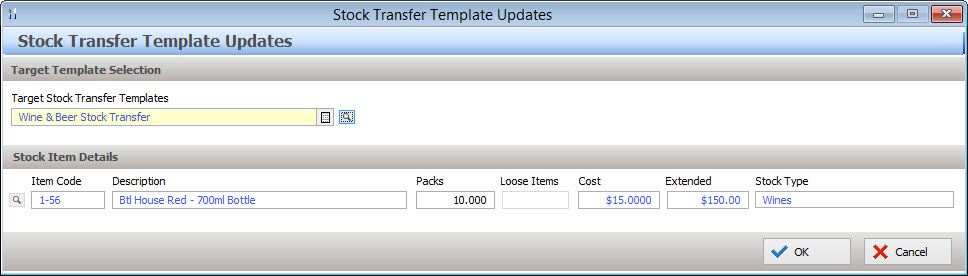
If a stock transfer needs to be included many templates e.g a case of wine which is often transferred from the Admin department to the Bar department and the same case of wine is often transferred from the Admin department to the Restaurant department, a transfer entry can be added to, modified or removed from a number of Stock Transfer Templates at once by: •Save the Stock Transaction Template by clicking the OK button. •Re-open the Stock Transfer Template by highlighting it and then clicking the Change button; •Highlight the stock transfer entry which will be included in, modified or removed from multiple templates, then tick the Edit Selected Item tick box; •Click the Edit Item in Multiple Templates button. The pop-up menu which appears provides options to: oAdd New Item - A new item can be added to a selection of Stock Transfer Templates at once by selecting this option; oEdit Selected Item - Existing entries in a selection of Stock Transfer Templates can all be updated at once by selecting this option; oDelete Selected Item - Existing entries in a selection of Stock Transfer Templates can be removed from all templates at once by selecting this option. After making your selection, the Stock Transfer Template Updates form will be displayed.
•Click the browse button •Click the browse button •Enter the transfer amounts (any packs and/or loose items) to transfer; •Click OK to apply the update.
•If the Add New Item option was selected, the selected stock item with the specified packs and loose items will be added to each of the selected Stock Transfer Templates; •If the Edit Selected Item option was selected, any existing entries for the selected stock item which exist in the selected Stock Transaction Templates will be updated with the specified Pack Quantity and Loose Items quantity; •If the Delete Selected Item option was selected, any entries for the selected Stock Item will be removed from the selected Stock Transaction Templates.
|

See Also:
Polygon Inventory > Getting Started with Polygon Inventory
Polygon Inventory > Using Polygon Inventory
Polygon Inventory > Stock Transfers File
Polygon Inventory > Stock Transfer Templates File
Polygon Back Office > Departments File
Polygon Back Office > Chart of Accounts
Getting Started with Polygon Back Office