If floor plans are enabled on a POS Terminal, staff members are presented with the Floorplan Keypad after logging on.
As a staff member enters the terminal, the Table Map is displayed. This map shows the table numbers in your establishment and advises the staff member which tables are occupied and which are vacant. More than one page may be created for different areas, eg Inside/Outside; Upstairs/Downstairs, etc. Use the ‘Previous Floor’ and ‘Next Floor’ buttons to move between table maps.
Tables are colour coded to indicate their current status.
•The tables which are available (have no active sale) will have BLACK text and no colouring.
•The tables which are active are shown with a RED panel behind the table name.
•If you enable a Table Service Threshold time, a table which has not been accessed for a designated amount of time is shown with a PINK panel to highlight that staff may need to re-visit the table soon. The Table Service Threshold setting is assigned from Polygon POS Management > POS Location Settings > POS Terminal Settings > Table Floor Plans - General.
•A table which has had their bill printed out is shown with a YELLOW panel to highlight that it will soon be vacated and available for turnover.
Each terminal can have floorplans enabled or disabled from the BOH. If a floorplan is disabled on a terminal, the terminal will move directly to the product keypads when a user logs on. Floorplans are enabled/disabled by ticking or un-ticking the Enable Table Floorplan setting on the Polygon POS Management > POS Terminal Details form.


Using the function keys at the top of the table map, a staff member who has been assigned the Edit Graphical Table Map privilege may: •Create a new table by copying the image from one table (using ‘New From’ button) then dragging the new table to its desired position, and naming it accordingly. •Move the physical location/position of an existing table. •Delete a whole table image from its location (deletions will be denied if an active sale is saved to that table) •Edit the name or the assigned image of a table (table number cannot be changed if an active sale is saved to that table. Staff with no Table Map privilege may: •Enter/OPEN the table and osave a sale against the table orecall and finalise a sale saved to a table oenter and finalise an ‘Over The Counter’ sale •Merge table contents into one bill •Move table contents from one table to another •Return to the ‘Log On’ screen.
The Edit Graphical Table Map POS Staff Privilege is assigned from Polygon POS Management > POS Staff Accounts > POS Staff Details.
|
A table is opened simply by pressing the appropriate table number on the table map. The product keypad will then be displayed and the sale may be entered.
See section FOH > Entering A Sale - The Product Keypad Screen for more information about recording customer orders.
|
An ‘Over the Counter’ (OTC) sale is one which is never saved to a table, ie, the order is placed and paid for at the same time. •Press the Over the Counter Sale button on the Table Map located on the right hand side of the window. •The product keypad will then be presented for the sale to be entered.
See section FOH > Entering A Sale - The Product Keypad Screen for more information about recording OTC customer orders.
|
If you wish to move the contents of a table to another table this can be done from the floorplan keypad by: •Select the Move Table Contents button; •Click on the current table; •The system will then prompt you to select the target table, select the table which orders will be moved to; •Press Yes to confirm the move
Note: After pressing the Move Table Contents button it changes to the Abort Move button. Press this button if you wish to cancel the move.
|

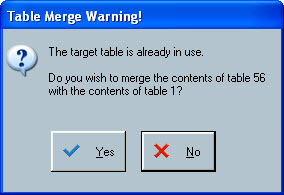
It is also possible to merge the items saved against one table with the items saved against another. This function may be required if, for example, the two people seated at table 11 decided to join the two people seated at table 18.
This is accomplished in the same way as a Table Move except that the target table will be one which is already ‘occupied’, ie, it shows on the table map in red.
•Select the Move Table Contents button; •Click on the current table; •The system will then prompt you to select the target table, select the table which orders will be merged with; •Press Yes to confirm the merge.
Note: After pressing the Move Table Contents button it changes to the Abort Move button. Press this button if you wish to cancel the move.
|
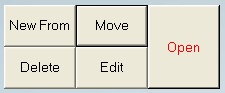
Staff members who have been assigned the 'Edit Graphical Table Map' privilege have the option to create new tables or move, edit and delete existing tables. Important: Any changes made using these action buttons are not permanent. Next time you download an update, the floorplan keypad will revert to its original state. If you wish to make permanent changes to the Floorplan Keypad, these changes can be made at the back-of-house. See section Polygon POS Management > Floorplan Keypad for more information about editing Floorplan keypads at the BOH.
The following options are available to POS Staff who have the Edit Graphical Table Map privilege: •New From If you wish to create a new table, you can do this by: oClick on the New From button; oEnter your password; oSelect an existing table to copy; oDrag the new table to the desired position (click to save); oComplete the Table details; oPress OK.
•Move If you wish to move a table to different position on the Floorplan Keypad, you can do this by: oClick on the Move button; oSelect the table; oDrag and Drop the table in the new position (click to save).
•Edit If you wish to change the name or image of a table, you can do this by: oClick on the Edit button; oSelect the table. oChange the table name using the Keyboard button oOr change the table image using the browse button oPress OK to save
•Delete If you wish to delete a table from the Floorplan Keypad, you can do this by: oClick on the Delete button; oSelect the table to remove; oPress Yes to confirm
|


If you wish to return to the Log-On screen so that another user can use the system, simply click on the Back to Log-On Screen button.
|
Floorplans can be designed to reflect the layout of your serving area including custom graphics such as photos or logos as shown in the Graphical Floorplan, or, designed in a simple grid layout as shown below under the standard floorplan heading.
Graphical Floorplan:
Standard Floorplan:
|


See Also:
See section Polygon POS Management > Keypads Overview > Floorplan Keypads for information about creating and editing Floorplan Keypads from the BOH.
See section Polygon POS Management > POS Staff Details for more information about configuring POS Staff Privileges
See section Polygon POS Management > POS Terminal Details for more information about enabling table maps on POS terminals