The Polygon Paperless - Kitchen Management System (KMS) module provides a powerful way to manage orders once they are sent to kitchen production areas. This is achieved by configuring a number of roles which determine which items will be displayed together on kitchen displays. Several kitchen monitors can be assigned to share a role, enabling the order queue to be intelligently distributed between multiple kitchen displays which share the same role. The Kitchen Management System is an optional add-on module for Polygon POS Management.
Getting Started with KMS

Before kitchen displays can be used at the FOH, KMS Roles must be configured from the POS Management. KMS Roles are setup in a similar way to production printer peripheral devices. A number of kitchen displays can share a single role, so it is not necessary to configure a different role for each kitchen display. Instead a role will be setup for each set of PLUs which will be prepared at a kitchen station. If a kitchen station will receive orders from multiple POS terminals, its role should be setup once (usually for the master terminal) and the other POS terminals should be assigned that role via a shared network peripheral connection. See section POS Management > Kitchen Display Peripheral for more information about configuring KMS Roles from the Peripheral Details Form. Remember to send an update to the FOH once your KMS roles have been configured. For more information about sending POS updates, see section: POS Management > Sending POS Network Updates.
|
Kitchen Displays show load information for each order assigned to that display, as well as total load information for a kitchen display. Load information includes the number of items assigned to an order and the estimated make time for an order.
Kitchen displays will automatically balance load between multiple kitchen displays sharing the same role. Load balancing assigns new orders to the kitchen display with the least load, that is the kitchen display with the least total estimated make time. A kitchen display's total estimated make time is calculated by adding the total make time of all PLUs belonging to orders which have been assigned to a display. PLUs are assigned estimated make times from the POS Management > PLU Details form. See section PLU Details > Pricing / Loyalty Details for more information about configuring KMS load for PLUs. |
The KMS System can be run at the FOH by double clicking on this icon from your kitchen monitor's desktop.
The first time a kitchen display is run, it will display a message indicating no role has been assigned to this device. Follow these steps to assign the kitchen display to a role. •Click the OK button and enter your password. This will display the System Settings Update form. Note: Your FOH user account will need to be assigned the "Reset master terminal (POS manager)" privilege to proceed with this process. See section POS Management > POS Staff Accounts for more information about assigning FOH staff account privileges.
•Click the browse button •Highlight the role which this kitchen display will use and then click on the Select button (This role can be changed later as required). •Click on the OK button to save this change
A message advising that a restart of the application is required will be dislayed. Click the OK button and re-open the Kitchen display by double clicking (or double tapping) this icon
This kitchen display may now be run by double clicking (or double tapping) on the KMS icon
|
 If you can't find this icon please contact the Redcat support team for assistance by phone on 1300 473 322 - then select option 3 for support, or by email at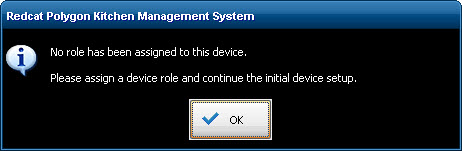

 next to the