Forcing Reset of Trading Data Each Day
To ensure that trading data is separated and reported over the correct dates and times, users can now enable the Forced Reset of Trading Data within Polygon POS Management.
This functionality ensures that no sales may be entered on any terminal within the POS network unless a Master Terminal reset has been performed for the previous day's trade.
The system calculates the end of day time using the End of Business Day Threshold. If there is no time entered as the threshold, the end of day will be deemed to be midnight. If, however, a trading time threshold of 5:00am has been set, the system calculates the previous day to cover the 24 hour period from 5:00am to 5:00am. The Force Z-Reads on POS Terminals Before Start of Trading Day setting must also be ticked. Both the End of Business Day Threshold and the Force Z-Reads on POS Terminals Before Start of Trading Day settings are available from the Polygon POS Management Location Settings in the Z-Read General section - Polygon POS Management > Location Settings > Z-Read General click this link for more information.
If a Reset has not been performed at the completion of the previous days’ trade, and a POS Staff Member tries to enter a new sale, the following message is displayed to advise them that a reset must be performed before any further sales can be recorded.
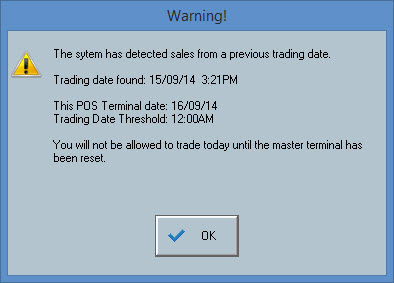
After clearing this message the user will not be able to enter any sales until the Master Terminal has been reset. After resetting the Master Terminal normal operations resume and trading is allowed again.
Reminder: You must send an update to your POS Terminals, and download the update before these new settings will take effect.
See Also:
FOH > Closing Procedure - Reconciling & Resetting The Terminal
Polygon POS Management > POS Revenue Processing
Polygon POS Management > Location Settings > Z-Read General
Getting Started with Polygon POS Management