The POLYGON PAYROLL module reached end of life on 30 June 2021 and this was communicated to all clients licensed with this module.
This module is no longer supported.
Historical transactions may be accessed although entry of new payslips is no longer possible.
This section explains how to record payments for Salaried Employees and Wage Earners. Payments can be created from the Employees File.
To create a new employee payment follow these steps:
•From Polygon Back Office;
•Open the Employees file by clicking the Employees button on the toolbar;
•Highlight the Employee whom the payment will be made to and click the New Payslip button at the bottom of the form.
From this point, the process of creating a new payment differs slightly depending whether the selected employee is a wage earner or a salaried employee. Both methods are described below.

Reminder: To make sure all shifts are included in this payment, remember to reset your time and attendance file at the FOH and then load the shift data into the BOH before creating payments for Wage Earners. •If the selected employee is a wage earner, the Timesheet Details form will be displayed. Enter the Week Ending date. This is the last day of the pay week for this payment period. The form will display any loaded shift times for the week which ends on this date. The shift start times, shift finish times and the base rates of these shifts can be changed if there is an error. To change the base rate for a shift, click browse button •The Employee Payslip Detials form will be displayed. This form displays Gross Wages, Tax and Superannuation figures which are automatically filled based on the shift times and base rates. Note: Text which is coloured blue is read-only and can not be modified directly. •Allowances and Deductions, Sick Leave and Annual Leave for this payment period can also be entered from this form. See Section Polygon Payroll > Employee Payslip Details for more information explaining how to record these details. •To save this payment click the OK button. The newly saved payment will be stored in the Polygon Payroll > Employee Payments File
Timesheet Details for for Wage Earner
Payslip Details for Wage Earner
|


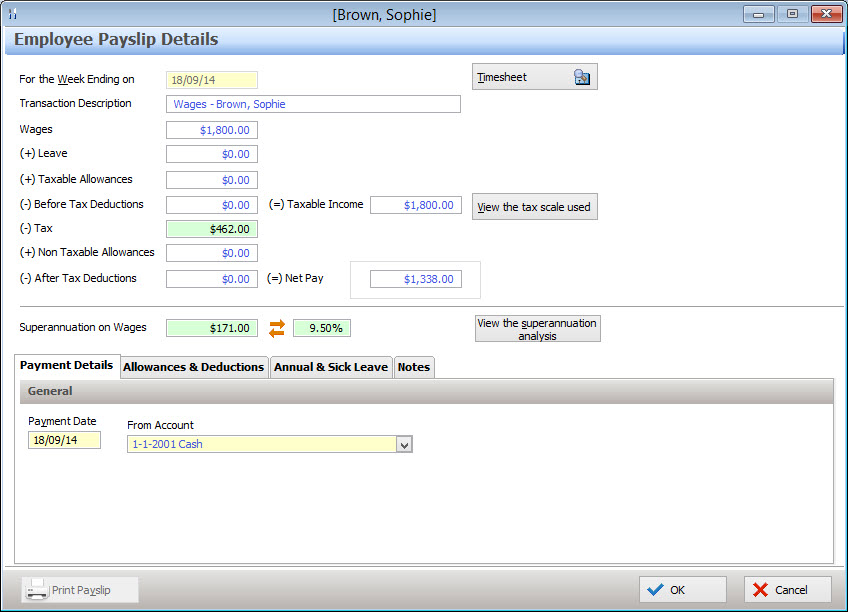
•If the selected employee is a salaried employee, the EmployeePayslip Details form will be displayed. The Employee Payslip Details form displays a summary of the different data relevant to this payment. Data in blue is read only and can't be edited. The following data can be changed if necessary: •Week Ending Date (in mm/dd/yy format) - Enter the last day of this payment period; •Transaction Description - Enter a description for this payment; •(-) Tax Deduction - How much tax is paid. This figure can be Reset back to system calculated value by right clicking and selecting Reset; •Employer superannuation contribution amount. Can be set by percentage or monetary value;
This form is also used to set: •How the payment is made (cash, credit card, cheque account, direct debit). This information is entered from the Payment Details tab; •Which allowances/deductions are applied to the payment. This information is entered from the Allowances & Deductions tab; •How much annual or sick leave has been taken in the specified week. This information is entered from the Annual & Sick Leave tab; See section Employee Payslip Details form for more detailed information about entering this information. •To save this payment click the OK button. The newly saved payment will be stored in the Polygon Payroll > Employee Payments File
|

Employee payslips can be paid by cash, cheque or direct deposit. The Payment Details tab allows you to select how this payslip will be paid. From the Payment Details tab, select : •The date which the payment will be made on, •The bank account the payment will be made from, (or choose Cash for cash payments). •If the payment will be made by cheque: oRecord the cheque number or click next cheque to automatically select the next available cheque number; oTo print this cheque when this payslip is saved, tick the Print Cheque on OK tick box.
See section Polygon Payroll > Paying Employees Electronically - Direct Entry Files for information about electronically sending direct deposit employee payment information to your financial institution for processing.
|
Click OK to save this payslip.
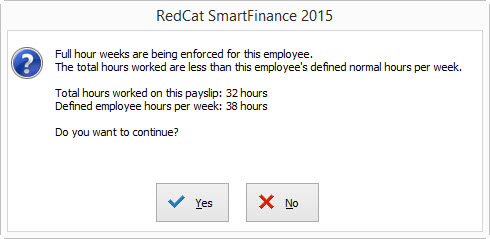
If you have enabled the Ensure that a full hour work week is worked for option, timesheets for new payslips will be automatically checked and a notification will be displayed if the recorded timesheet hours (plus sick leave and annual leave) are less than the employees Normal Hrs/Week setting (as configured on from the Employee Details form). When this message is displayed, if you wish to change the timesheet hours or add annual leave or sick leave, click the No button to return to the Payslip Details form where these changes can be made. If you wish to save this payslip as it is, click the Yes button. These checks can be applied to full time employees, part time employees, both or neither. To select which employee classification to enforce full hour week rules for, select either Full Time & Part Time Staff, Full Time Staff, Part Time Staff or None from the Ensure that a full hour work week is worked for drop-down list-box on under the Other heading on the Payroll Award Details form.
See Also: An employee's Normal Hrs/Week setting can be assigned from the Employee Details form on the Payroll Details tab. The Full Hour Week Requirements setting can be enabled/disabled from the Payroll Award Details form. For more information about running a Payroll Batch see section Employees File.
|
See Also:
Polygon Payroll > Getting Started with Polygon Payroll
Polygon Payroll > Using Polygon Payroll
Polygon Payroll > Paying Employees Electronically - Direct Entry Files
Polygon Payroll > Employees File
Polygon Payroll > Employee Payments File
Getting Started with Polygon Back Office